
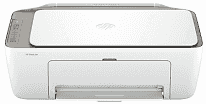
HP DeskJet 2923 Driver lets the operating system detect the all-in-one printer and send print jobs through USB or wireless setup. Scanning works through compatible software after the driver package is installed. Copying stays on the printer itself, so a computer connection is not required for that function. The installed software keeps printing and scanning available to the system during normal use.
HP DeskJet 2923 Drivers for Windows
1bc30e7e1c545d9ac964bddb5c1c696303163e18b92d9a54de3fc09bdb7d47c5620068045902345004931235f980d18321eb73b2b9e83672a905b17b6e82367733a48d17157441a5f626bf8b2b5f85c04c1a524bacff1c548f899ad90978765ec11fe40d2b794ffeb0c9f87b6f22efe7b178646c583b58276f0dc4b24872778a83d239d64aa753b224ac1a5c229527fba7a264eb3653fb95af54a387b27b3b1bHP DeskJet 2923 Specifications
HP DeskJet 2923 combines thermal inkjet printing with flatbed scanning and basic copying. Ink comes from a two-cartridge setup: one black cartridge and one tri-color cartridge. The CIS flatbed takes one original at a time, up to 216 x 297 mm. A small icon LCD gives simple status prompts. There is no touch screen, fax modem, automatic document feeder, or multitasking support.
Black ISO pages print at up to 7.5 ppm, and color ISO output reaches up to 5.5 ppm. Draft mode runs faster at 20 ppm in black or 16 ppm in color, although that setting favors speed over final quality. Best black output reaches 1200 x 1200 rendered dpi. On selected photo paper, color printing can use optimized resolution up to 4800 x 1200 dpi. Scanning reaches 1200 dpi optically, and the copier can make up to nine copies at 300 x 300 dpi.
Paper loads from a 60-sheet input tray, then finished pages collect in a 25-sheet output tray. That lower output capacity fits short home print runs better than unattended stacks. A4, B5, and A6 sheets fit the feed, and DL envelopes use the same paper path. Custom paper can run from 76 x 127 mm to 215 x 355 mm. Plain paper, photo sheets, brochures, envelopes, and other inkjet media can pass through the tray. Two-sided printing needs manual turning because automatic duplexing is not built in. Borderless printing is not available.
A nearby computer can connect through the Hi-Speed USB 2.0 device port. Wireless printing runs over dual-band Wi-Fi on 2.4 GHz or 5 GHz networks. For phone and tablet jobs, the printer works with the HP app, Apple AirPrint, Mopria Print Service, and the HP Print Service Plugin. With the trays closed, the body measures about 425 x 304 x 154 mm. Opening the output extension increases the depth to 546.6 mm and the height to 250 mm. The printer weighs about 3.42 kg.
Technical Details
| Title | HP DeskJet 2923 Drivers |
|---|---|
| Device Type | All-in-one printer |
| Driver Version | Varies by driver and operating system |
| Available Downloads | Drivers |
| License | Free |
| Manufacturer | HP Inc. |