
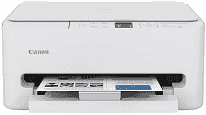
The Canon PIXMA TS6520 Driver helps your computer recognize the printer and send print jobs during setup and regular use. After installation, the operating system can communicate with the printer over a compatible connection. The driver also passes along settings such as paper size and print quality for documents and photos. Without a compatible driver, print jobs may fail or produce results that differ from your selected settings.
Canon PIXMA TS6520 Drivers for Windows
de4d09aa8fb1914ec109cec5105161b58646538b7fac0bbaffcb419edaa5d8e3af08860078d9dfd4ab88280d63890955cf9b798d8812c0bf08649058d2632be2Canon PIXMA TS6520 Drivers for macOS
a2a12e31313283450b6d22a2ffa56a79b8a9fcb935398ef221ff430c551796fd8e072643503e0e86e5fa046b4bcf622fa33dfb7c701b030989e6616b16593bfaCanon PIXMA TS6520 Specifications
The Canon PIXMA TS6520 prints, scans and copies, but has no fax function. Its FINE printhead uses a PG-295 pigment black cartridge and a CL-286 dye-based color cartridge. The color cartridge holds cyan, magenta, yellow and black together, so these inks cannot be replaced separately. Settings appear on a 1.42-inch monochrome OLED. With no automatic document feeder, originals must be placed individually on the CIS scanner glass.
Print resolution reaches 1,200 × 1,200 dpi. On letter-size documents, speeds run around 14 images per minute in black and 9 in color. The first page takes roughly 7.5 seconds in black, or 9.5 seconds in color. Automatic duplex printing handles both sides of a sheet, and borderless output reaches letter size. On the flatbed, optical scanning resolution is 1,200 × 2,400 dpi; copy zoom ranges from 25% to 400%.
One cassette holds 100 sheets of plain paper. It also takes letter-size documents and photo sheets from 4 × 6 to 8 × 10 inches. Square 5 × 5-inch photos fit, as do 5 × 7 and 7 × 10-inch sizes. Envelopes and greeting cards use the same feed, so switching stock means clearing the cassette. Plain paper weighs 64–105 g/m²; selected Canon photo paper reaches about 275 g/m².
USB connects a nearby computer. Over Wi-Fi, the printer can join either a 2.4 GHz or 5 GHz network, and Wireless Direct can connect without a router. AirPrint and Mopria handle printing from compatible phones or tablets. The closed body measures about 14.8 × 14 × 6.7 inches and weighs 11.6 pounds. Canon specifies 21 W during operation and a recommended monthly print volume of 500 pages.
Technical Details
| Title | Canon PIXMA TS6520 Drivers |
|---|---|
| Device Type | All-in-one printer |
| Driver Version | Varies by driver and operating system |
| Available Downloads | Drivers |
| License | Free |
| Manufacturer | Canon Inc. |