
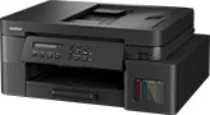
Brother DCP-T835DW Driver helps the computer communicate correctly with this ink tank multifunction printer. After installation, the operating system can recognize the machine for printing and scanner access. Copying runs from the printer hardware itself, so it does not rely on a computer command. Faxing is not built into this DCP model. Wired and wireless connections carry print and scan data according to the selected setup.
Brother DCP-T835DW Drivers for Windows
d36e7ea31942df4765d83368f81b6fd8e3ecb7a1a46b1832511e4b47fb5f475a0f3ca9cfa40ff9c3d0b2b6297d595dce4c9fb2d0df62cc54db44f72ebd7a35ab0f3ca9cfa40ff9c3d0b2b6297d595dce4c9fb2d0df62cc54db44f72ebd7a35ab0edce9170c3f46f065e52aa6335c093befa453212698a94c7d59fcfc5197fa7e71169ef33cab91b5dc1e848ff483c40ad2eec7be44e69fcb0c084a590a79b49eBrother DCP-T835DW Drivers for macOS
ba82deb3cfde97e46a2652ed3238dc2d86bd3d28c8dba3b70d6c4c6810924564Brother DCP-T835DW Drivers for Linux
39478b3738227ac8e841c0e46db0ed4307d8c7622304cce359d6e0cacb6429dc3390f71ce3140e0cc5bd8eecfc9eccb8982cce51d61c3740ab3d93ecccebd0669c3a200db3dc7b2b3332dff8c5226b4f3ee560d20b2e1f4918b1faf7124517b2197f63a52e89b8744f5a3c2d843abb3b76d003d5d4830bdfe675c44841a6c72bcda25534ea8e3018e7d46b970cb08b36084355adedc933aba0c8c7d03e903db901dc859f1978e645147ced5ec4b5448cc3e26b1c6d2f1104834f5891c0e17469d724746540a51f8286f2a318b47657227f7131d384a1a4f0475dacb7e3580f3ee74ef3a5529ebf3b26d6139ce15d75374a4538ba2efd48c28b209b0d705e5ec72ba3bffcf199fee6387cb79d6923214648db0f2df1c5a13f8f8f0a6fe0995c401404f2622e60470b4de25d0cdb4adc0f130ace6b380cc0d4b3d7714ad761c1ae82aa17ba2e331de1fcb34f0a839d27b9b193ac680d9742250a89e588a6bd56206c4e17c6dbcf263d9d08fb460ccd5b9f1a23fce79b30d0a41d96a224839322b2Brother DCP-T835DW Specifications
Brother DCP-T835DW is an inkjet ink-tank multifunction printer for colour printing, scanning, and copying. Fax hardware belongs to the related MFC models, not this DCP machine. Printing comes from a piezo printhead with 210 black nozzles and 210 nozzles for each colour. The control panel uses a standard one-line LCD, and the machine carries 128 MB of memory. Document capture can run from the flatbed glass or the 20-sheet automatic document feeder.
Print resolution reaches up to 1200 x 6000 dpi. Borderless output is listed up to 210 mm wide. Automatic two-sided printing works with plain or recycled paper in A4, Letter, Executive, A5, B5, and B6 sizes. Scanning reaches 1200 x 2400 dpi from the glass and 1200 x 600 dpi from the ADF. Copying prints at up to 1200 x 2400 dpi, with stack or sort output for up to 99 pages. Reduction and enlargement settings run from 25% to 400%.
Paper feeds from a 150-sheet main tray and an 80-sheet multipurpose tray. Both trays accept plain, inkjet, glossy, or recycled paper. The main tray also takes A4, Letter, Legal, India Legal, Folio, envelopes, photo sizes, and index card media. Photo L paper is listed for the multipurpose tray. Printed sheets collect in a 50-sheet output area. The ADF accepts originals from 139.7 to 215.9 mm wide.
A nearby computer can connect through Hi-Speed USB 2.0. Wired networking uses Ethernet over a Category 5 or greater cable. Wireless LAN and Wi-Fi Direct are also part of the connection hardware. For India and nearby Southeastern Asia listings, infrastructure wireless uses IEEE 802.11a/b/g/n. Wi-Fi Direct uses IEEE 802.11a/g/n. Network printing and scanning can run over IPv4 or IPv6. The machine weighs 9.6 kg, draws about 16 W when copying, and stays near 3.0 W in ready mode.
Technical Details
| Title | Brother DCP-T835DW Drivers |
|---|---|
| Device Type | All-in-one printer |
| Driver Version | Varies by driver and operating system |
| Available Downloads | Drivers |
| License | Free |
| Manufacturer | Brother Industries, Ltd. |