
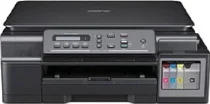
Brother DCP-T500W Driver helps the computer recognize this multifunction ink-tank printer during setup. After recognition, print, scan, and copy commands can pass through the selected connection. Wireless setup must also point print and scan commands to the correct device path. Once setup is complete, printed pages and scanned files can move between the computer and the Brother DCP-T500W with proper device recognition.
Brother DCP-T500W Drivers for Windows
be1971228dbeb4bd335c57b23a142b8add821a4c3df34299529d0797bd16ba802a40b91fa12cc7dfd5d86c4bbf76ea6e8e368693cb6ca74e9e0380a6a587b48d2a40b91fa12cc7dfd5d86c4bbf76ea6e8e368693cb6ca74e9e0380a6a587b48d0edce9170c3f46f065e52aa6335c093befa453212698a94c7d59fcfc5197fa7eBrother DCP-T500W Drivers for Linux
98e4f7a7160e78bf950685405bcc8c52c177d14ce5303a77991917bb58f21038f81bc310ba6d41561177672599961315e6b4703b5f27ad8387ca8621c3b30d382e15500b376f81f81b551a76aae0ba7fe31095e58d298f3014545da61113c821629bebd17b96df48420bcccc1985c9fc14fd9b77346705f35bc0ab14454a8bae027b73648722ac8c8eb1a9c419d284a6562cc763feac9740a2b75a683b09297289d82315fd9d629f8af7b5bc489f392da218acfe2436e42eec147246101636d5cda25534ea8e3018e7d46b970cb08b36084355adedc933aba0c8c7d03e903db901dc859f1978e645147ced5ec4b5448cc3e26b1c6d2f1104834f5891c0e174694225e91dd7f7d0ba2a202f616b15b669be7800c271a7d25efed94191f71fc4500fec3bcffeb597b2d23ef7ff31f34dc7bd8d4736a35c2d1ff5e56784d709ce532ba3bffcf199fee6387cb79d6923214648db0f2df1c5a13f8f8f0a6fe0995c401404f2622e60470b4de25d0cdb4adc0f130ace6b380cc0d4b3d7714ad761c1ae82aa17ba2e331de1fcb34f0a839d27b9b193ac680d9742250a89e588a6bd56206c4e17c6dbcf263d9d08fb460ccd5b9f1a23fce79b30d0a41d96a224839322b2Brother DCP-T500W Specifications
Brother DCP-T500W is a colour ink-tank multifunction inkjet with print, scan, and copy functions, while fax hardware is not part of this DCP model. Printing comes from a piezo head with 210 mono nozzles and 70 nozzles for each colour. The refillable tank system uses Brother ink bottles rather than cartridges. Local control runs through a 16-character, one-line LCD with 64 MB memory.
Print resolution reaches up to 1200 x 6000 dpi, while ISO print speed runs up to 11 ipm in mono and 6 ipm in colour. Fast mode reaches 27 ppm mono and 10 ppm colour. Flatbed scanning works at up to 1200 x 2400 dpi optical resolution. Interpolation reaches up to 19200 x 19200 dpi. Copy output reaches up to 1200 x 2400 dpi.
The flatbed accepts originals up to 213.9 mm wide and 295 mm long. Copying runs in colour or monochrome, with stacks or sorts up to 99 pages. Reduction and enlargement move from 25% to 400% in 1% steps, while copy width is held at 204 mm. Borderless printing covers A4, Letter, A6, Photo, Photo 2L, and listed index-card media for edge-to-edge print output.
Paper input comes through a tray for about 100 sheets of 80 gsm plain paper, while output holds up to 50 sheets. The tray accepts plain, inkjet, glossy, and envelope media in A4, Legal, Executive, Letter, JIS B5, A5, A6, and photo sizes. Computers connect through Hi-Speed USB 2.0. Wireless LAN is available with WPS setup. Dimensions are 435 mm x 374 mm x 161 mm, and weight is 7.1 kg.
Technical Details
| Title | Brother DCP-T500W Drivers |
|---|---|
| Device Type | All-in-one printer |
| Driver Version | Varies by driver and operating system |
| Available Downloads | Drivers |
| License | Free |
| Manufacturer | Brother Industries, Ltd. |