
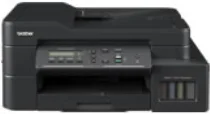
Brother DCP-T825DW Driver lets the computer work with this ink-tank all-in-one printer for printing and scanning. After installation, the operating system can identify the Brother print and scan hardware instead of treating the machine as an unknown device. A USB or wireless setup still needs the correct driver package before commands move through the selected connection. Copying remains handled from the printer itself, while computer-based documents and scan jobs use the installed software path.
Brother DCP-T825DW Drivers for Windows
7ed776bab8be9e41815460d60ea45d87e503341d03a76f8bd61be29b8b46487e8a29d78ea9ce4db7aea7bb16c151f08a8f155b3364ed3c4ccf0da73c0564da938a29d78ea9ce4db7aea7bb16c151f08a8f155b3364ed3c4ccf0da73c0564da930edce9170c3f46f065e52aa6335c093befa453212698a94c7d59fcfc5197fa7e5b2b4c8a8829c0bcb136d12fb3520d01d301033aa6a2611da67d29b70eebdf0971169ef33cab91b5dc1e848ff483c40ad2eec7be44e69fcb0c084a590a79b49eBrother DCP-T825DW Drivers for macOS
88d3930503f447173dffd23704b2701f9f0c22e2faa0f4ff175bc2cbf74d7ef0Brother DCP-T825DW Drivers for Linux
4c30e66ed6114a0b73d9e5556ba8964937a304c79a910eb0c3248cd2a3b32d9b969201f5933fc1e4f35faefcfb57207c39e55c0a10c403fd20bc9614c1c5e6829c3a200db3dc7b2b3332dff8c5226b4f3ee560d20b2e1f4918b1faf7124517b2197f63a52e89b8744f5a3c2d843abb3b76d003d5d4830bdfe675c44841a6c72bcda25534ea8e3018e7d46b970cb08b36084355adedc933aba0c8c7d03e903db901dc859f1978e645147ced5ec4b5448cc3e26b1c6d2f1104834f5891c0e17469d724746540a51f8286f2a318b47657227f7131d384a1a4f0475dacb7e3580f3ee74ef3a5529ebf3b26d6139ce15d75374a4538ba2efd48c28b209b0d705e5ec72ba3bffcf199fee6387cb79d6923214648db0f2df1c5a13f8f8f0a6fe0995c401404f2622e60470b4de25d0cdb4adc0f130ace6b380cc0d4b3d7714ad761c1ae82aa17ba2e331de1fcb34f0a839d27b9b193ac680d9742250a89e588a6bd56206c4e17c6dbcf263d9d08fb460ccd5b9f1a23fce79b30d0a41d96a224839322b2Brother DCP-T825DW Specifications
Brother DCP-T825DW is an inkjet ink-tank multifunction printer for colour printing, scanning, and copying. Fax hardware belongs to related MFC models rather than this DCP unit. Printing comes from a piezo print head with 210 black nozzles and 210 nozzles for each colour. Local control runs through a one-line LCD, not a colour touchscreen. For document capture, the machine uses a flatbed glass and a 20-sheet automatic document feeder. Its 128 MB of memory supports the print, scan, and copy hardware inside the unit.
Print resolution reaches up to 1200 x 6000 dpi. The normal printable width is 204 mm, and borderless mode extends the width to 210 mm on supported media. Borderless printing is limited to A4, Letter, A6, photo, Photo L, Photo 2L, and index-card sizes. Automatic duplexing works only with plain or recycled paper. That paper path accepts A4, Letter, Executive, A5, and B5. Scanning reaches 1200 x 2400 dpi from the flatbed glass. Through the ADF, scan resolution reaches 1200 x 600 dpi.
Paper input is divided between the standard tray and an 80-sheet multipurpose tray. Printed sheets collect in a 50-sheet output area. The multipurpose tray takes 64 to 220 gsm stock. Plain, inkjet coated, glossy, and recycled paper can be loaded, depending on the selected feed path. Standard sheet sizes include A4, Letter, Legal, Mexico Legal, India Legal, Folio, Executive, B5, A5, B6, and A6. Photo sheets and index cards also fit. Envelopes use C5, Com-10, DL, or Monarch sizing.
A nearby computer can connect through Hi-Speed USB 2.0. Network printing and network scanning can run over wired Ethernet or wireless LAN. Wi-Fi Direct creates a direct wireless link without using the router. PC-fax functions stay with the related MFC versions rather than this DCP design. ADF originals may measure 148 to 215.9 mm wide and 148 to 355.6 mm long. Originals longer than 297 mm feed one page at a time. The listed body weight is 9.6 kg.
Technical Details
| Title | Brother DCP-T825DW Drivers |
|---|---|
| Device Type | All-in-one printer |
| Driver Version | Varies by driver and operating system |
| Available Downloads | Drivers |
| License | Free |
| Manufacturer | Brother Industries, Ltd. |