
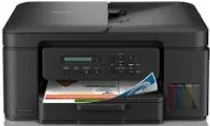
Brother DCP-T735DW Driver helps the computer communicate correctly with this ink tank multifunction printer. After installation, the operating system can recognize the unit for printing and scanning. Copying still runs from the printer controls, while the driver keeps computer-based print and scan commands available. A USB cable can carry direct jobs from a nearby computer. Wireless setup lets supported devices send print requests over the network in the proper format.
Brother DCP-T735DW Drivers for Windows
02ac0e7ff96e1bbb13a318c9c5eb3f92d7475848eac71755bd3523edf8d8a4453f4a49ef7e3ab2c521aab8338ce374ef05e16ee0d0cb8a40942938933479ccec3f4a49ef7e3ab2c521aab8338ce374ef05e16ee0d0cb8a40942938933479ccec0edce9170c3f46f065e52aa6335c093befa453212698a94c7d59fcfc5197fa7e71169ef33cab91b5dc1e848ff483c40ad2eec7be44e69fcb0c084a590a79b49eBrother DCP-T735DW Drivers for macOS
72397ea3e710e622b3c0015147005d5458b8aa566971e1bbafc54d71bc2fcfb1Brother DCP-T735DW Drivers for Linux
2b6023ecb2ac363f6b6915596a0eefde9614042e41b6d7282af07d0475a448edf79ef0766d0b7657e94638444dffa0bebb5f4501fad01eb3fc4126307c7c546b9c3a200db3dc7b2b3332dff8c5226b4f3ee560d20b2e1f4918b1faf7124517b2197f63a52e89b8744f5a3c2d843abb3b76d003d5d4830bdfe675c44841a6c72bcda25534ea8e3018e7d46b970cb08b36084355adedc933aba0c8c7d03e903db901dc859f1978e645147ced5ec4b5448cc3e26b1c6d2f1104834f5891c0e17469d724746540a51f8286f2a318b47657227f7131d384a1a4f0475dacb7e3580f3ee74ef3a5529ebf3b26d6139ce15d75374a4538ba2efd48c28b209b0d705e5ec72ba3bffcf199fee6387cb79d6923214648db0f2df1c5a13f8f8f0a6fe0995c401404f2622e60470b4de25d0cdb4adc0f130ace6b380cc0d4b3d7714ad761c1ae82aa17ba2e331de1fcb34f0a839d27b9b193ac680d9742250a89e588a6bd56206c4e17c6dbcf263d9d08fb460ccd5b9f1a23fce79b30d0a41d96a224839322b2Brother DCP-T735DW Specifications
Brother DCP-T735DW is an inkjet ink-tank multifunction printer for color printing, scanning, and copying. Fax hardware is not built into this model. Its piezo printhead has 210 black nozzles and 210 nozzles for each color. A one-line LCD sits on the control panel instead of a touchscreen, and the machine uses 128 MB of memory. Originals may be laid on the flatbed or loaded into the 20-sheet automatic document feeder.
Print resolution goes up to 1200 x 6000 dpi. Brother rates A4 one-sided printing at 16.0 ipm. Automatic two-sided output runs at 7.0 ipm. The first page comes out in 6.2 seconds for mono printing and 6.5 seconds for color. Scanning uses a CIS sensor, with 1200 x 2400 dpi from the glass and 600 x 600 dpi through the automatic document feeder.
Paper loads from a 150-sheet standard tray or a one-sheet manual feed slot. Finished pages rest in a 50-sheet A4 output area. The main tray takes plain, inkjet, glossy, and recycled paper from 64 to 220 gsm. Heavier media can pass through the manual feed slot at up to 300 gsm. Accepted sizes include A4, Letter, Legal, Folio, Executive, A5, A6, photo paper, index cards, and C5, Com-10, DL, or Monarch envelopes.
Hi-Speed USB 2.0 gives the printer its direct wired connection. Wireless setup can run on 2.4 GHz or 5 GHz networks. Wi-Fi Direct, AirPrint, Mopria, and Brother Mobile Connect support direct or mobile printing, while Ethernet is left to higher models. With the carton removed, the body measures 390 x 343 x 183 mm and weighs 7.90 kg. Brother recommends up to 1,000 pages per month, and copying uses about 16 W.
Hi-Speed USB 2.0 gives the direct wired connection. Wireless networking can use both 2.4 GHz and 5 GHz bands. Wi-Fi Direct, AirPrint, Mopria, and Brother Mobile Connect handle direct or mobile printing, while Ethernet belongs to higher models. With the carton removed, the body measures 390 x 343 x 183 mm and weighs 7.90 kg. Brother recommends monthly output of up to 1,000 pages, and copying draws about 16 W.
Technical Details
| Title | Brother DCP-T735DW Drivers |
|---|---|
| Device Type | All-in-one printer |
| Driver Version | Varies by driver and operating system |
| Available Downloads | Drivers |
| License | Free |
| Manufacturer | Brother Industries, Ltd. |