
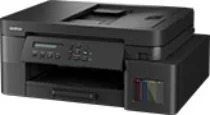
Brother DCP-T830DW Driver lets the computer work with the ink tank multifunction unit for printing, scanning, and copying. After installation, the operating system can identify the print and scan hardware instead of treating the machine as an unknown device. A USB connection or wireless setup still depends on the correct driver package before print jobs and scan commands move through the proper path. Copy work remains handled at the machine, but the same installation keeps computer-based printing and scanning tied to the right Brother model.
Brother DCP-T830DW Drivers for Windows
d36e7ea31942df4765d83368f81b6fd8e3ecb7a1a46b1832511e4b47fb5f475a0f3ca9cfa40ff9c3d0b2b6297d595dce4c9fb2d0df62cc54db44f72ebd7a35ab0f3ca9cfa40ff9c3d0b2b6297d595dce4c9fb2d0df62cc54db44f72ebd7a35ab0edce9170c3f46f065e52aa6335c093befa453212698a94c7d59fcfc5197fa7e71169ef33cab91b5dc1e848ff483c40ad2eec7be44e69fcb0c084a590a79b49eBrother DCP-T830DW Drivers for macOS
ba82deb3cfde97e46a2652ed3238dc2d86bd3d28c8dba3b70d6c4c6810924564Brother DCP-T830DW Drivers for Linux
9b40dd99be90b1fdaa34e973c983fc623e7b74d510eb7fa0aa5e26d4e3881548233f9b1dfc1c6ae0304407d4fb43314a99c34637ba5170930d4d1045e90063989c3a200db3dc7b2b3332dff8c5226b4f3ee560d20b2e1f4918b1faf7124517b2197f63a52e89b8744f5a3c2d843abb3b76d003d5d4830bdfe675c44841a6c72bcda25534ea8e3018e7d46b970cb08b36084355adedc933aba0c8c7d03e903db901dc859f1978e645147ced5ec4b5448cc3e26b1c6d2f1104834f5891c0e17469d724746540a51f8286f2a318b47657227f7131d384a1a4f0475dacb7e3580f3ee74ef3a5529ebf3b26d6139ce15d75374a4538ba2efd48c28b209b0d705e5ec72ba3bffcf199fee6387cb79d6923214648db0f2df1c5a13f8f8f0a6fe0995c401404f2622e60470b4de25d0cdb4adc0f130ace6b380cc0d4b3d7714ad761c1ae82aa17ba2e331de1fcb34f0a839d27b9b193ac680d9742250a89e588a6bd56206c4e17c6dbcf263d9d08fb460ccd5b9f1a23fce79b30d0a41d96a224839322b2Brother DCP-T830DW Specifications
Brother DCP-T830DW is an ink-tank multifunction printer for colour printing, scanning, and copying. Fax hardware is absent from this DCP model. Ink refills use four separate bottles: BTD100BK black, BTD100C cyan, BTD100M magenta, and BTD100Y yellow. Local operation runs through a one-line, 20-character LCD rather than a touchscreen. Inside the machine, 128 MB of memory serves the print engine, scanner, and copy functions.
Print resolution reaches up to 1200 x 6000 dpi from Windows. Under ISO testing, A4 output runs at up to 17.0 ipm in black and 16.5 ipm in colour. Automatic two-sided printing works only with plain or recycled paper. In that duplex path, compatible sizes are A4, Letter, Executive, A5, B5, and B6. Scanning reaches 1200 x 2400 dpi from the flatbed glass. Originals fed through the ADF scan at up to 1200 x 600 dpi, and copy runs can produce up to 99 pages.
Paper input comes through a 150-sheet main tray and an 80-sheet multipurpose tray. Printed pages collect in a 50-sheet output area. The two feeds take 64 to 220 gsm stock, including plain, inkjet coated, glossy, and recycled paper. Standard sheet sizes include A4, Letter, Legal, India Legal, Folio, Executive, and A6. Photo paper and index cards are also accepted. Envelopes fit in Com-10, DL, Monarch, or C5 sizes. The automatic document feeder holds 20 sheets.
A nearby computer can connect through Hi-Speed USB 2.0. Network printing can run over dual-band wireless networking or 10Base-T/100Base-TX Ethernet. Wi-Fi Direct creates a direct wireless link without using the router. Wireless security includes WEP, WPA-PSK, WPA2-PSK, and WPA3-SAE, but Wi-Fi Direct uses WPA2-PSK only. With the trays closed, the body measures 435 mm wide, 418 mm deep, and 180 mm high. The listed weight is 9.6 kg. Ready mode uses about 3.0 W, and power-off consumption is about 0.10 W.
Technical Details
| Title | Brother DCP-T830DW Drivers |
|---|---|
| Device Type | All-in-one printer |
| Driver Version | Varies by driver and operating system |
| Available Downloads | Drivers |
| License | Free |
| Manufacturer | Brother Industries, Ltd. |