
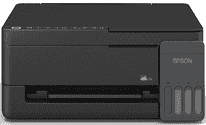
The Epson EcoTank L3310 Driver lets the computer recognise the print engine, flatbed scanner, and copy function in this USB-only ink tank multifunction printer. A nearby computer sends jobs through the USB connection, so network and wireless printing are not part of this model’s setup. Scanning relies on the flatbed glass, with one original placed on the scanner bed at a time. Once the driver is installed correctly, print settings and scan requests can move between the computer and the machine without the functions being detected as separate hardware.
Epson EcoTank L3310 Drivers for Windows
54245988748afbb4ee2111f04ad11f7f6d2eb0ff75f8323e489fa999b72bfa7fd3c752925e1f52de8d72b7560a814ff0de62ac47bb1f4f714dbbc1987c8c65064fb051980f8e047780022de66705e430946fd89e3845f6e1b854cdc9658d8e19Epson EcoTank L3310 Drivers for macOS
85443945da509bc9a38c5fdda2b7eb4395c66b583852b0a4ffa0bddb54e7ae40Epson EcoTank L3310 Drivers for Linux
53f67c99e60f414518c456b268611f70f1697a10b741c9981fa55ffd8ba72333Epson EcoTank L3310 Specifications
Epson EcoTank L3310 is a colour ink-tank all-in-one for printing, scanning, and copying. Printing comes from a piezoelectric head with 180 black nozzles and 59 nozzles for each colour channel. Four integrated tanks use Epson 003 bottles with keyed, colour-coded tips. Physical buttons replace a display or touchscreen. Originals must be placed on the CIS flatbed one at a time because no automatic document feeder is fitted.
Print resolution reaches 5760 x 1440 dpi. ISO speed is rated at up to 11.0 ipm in black and 6.0 ipm in colour, rising to 33 and 15 ppm in draft mode. The first black page takes about 10 seconds; a colour page takes roughly 16 seconds. Borderless printing is limited to photos up to 4R. Two-sided pages require manual handling because automatic duplex hardware is absent.
Scanning relies on 600 x 1200 dpi optical resolution across an area up to 216 x 297 mm. Colour scans use 48-bit input and 24-bit output, while grayscale drops from 16-bit input to 8-bit output. Standalone copying can produce up to 20 copies at 600 x 600 dpi. Copy speed reaches 7.0 ipm in black and 1.7 ipm in colour, using A4 or Letter originals on the glass.
The rear feed holds up to 100 sheets of A4 or Letter plain paper. Smaller loads apply to other stock: 20 glossy photo sheets, 30 postcards, or 10 envelopes. Printed pages collect in an output tray rated for 30 plain sheets or 20 glossy sheets. Standard paper sizes include A4, A6, B5, B6, and Letter. The same feed also accepts 4 x 6 photo paper plus C6 and DL envelopes. A nearby computer connects through USB 2.0, with no wireless interface built in. Waste ink collects in a user-replaceable maintenance box.
Technical Details
| Title | Epson EcoTank L3310 Drivers |
|---|---|
| Device Type | All-in-one printer |
| Driver Version | Varies by driver and operating system |
| Available Downloads | Drivers |
| License | Free |
| Manufacturer | Seiko Epson Corporation |