
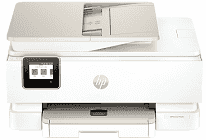
HP Envy Photo 7934 Driver lets the computer identify the all-in-one printer and exchange commands with it correctly. Setup can use a nearby USB connection or the printer’s wireless network link. Compatible applications can then access printing, flatbed scanning, and copying controls. Print settings travel to the machine with each job, and scanned pages return to the computer for saving or editing.
HP Envy Photo 7934 Drivers for Windows
434a673d4d90247012223e4124d63785bc76aa7eaf53d9df76213f8ee64dbe24620068045902345004931235f980d18321eb73b2b9e83672a905b17b6e82367733a48d17157441a5f626bf8b2b5f85c04c1a524bacff1c548f899ad90978765ec11fe40d2b794ffeb0c9f87b6f22efe7b178646c583b58276f0dc4b24872778a83d239d64aa753b224ac1a5c229527fba7a264eb3653fb95af54a387b27b3b1bHP Envy Photo 7934 Specifications
Printing comes from HP thermal inkjet hardware, with one black cartridge and one tri-color cartridge installed. Standard HP 303 supplies fit, and 303XL cartridges provide a higher page yield. The 2.7-inch capacitive color touchscreen carries the main controls. This all-in-one also copies and scans, including photo originals and everyday documents.
The flatbed takes originals up to 215.9 x 297 mm. For longer document batches, a 35-sheet automatic feeder reduces the need to place each page by hand. Scanning relies on contact image sensor technology and reaches 1200 dpi. Black documents print at up to 15 ISO ppm, with color pages reaching 10 ISO ppm. Draft mode raises those figures to 22 ppm and 20 ppm.
Maximum black output reaches 1200 x 1200 rendered dpi. Color printing can reach 4800 x 1200 optimized dpi when the computer supplies 1200 input dpi. Copy speeds reach 13 ISO cpm in black and 6 ISO cpm in color, with up to 50 copies in one job. Copies can be reduced to 25 percent or enlarged to 400 percent. Automatic duplexing takes care of two-sided printed pages.
Paper loads through a 125-sheet main tray, and a separate 15-sheet tray keeps photo paper ready. The main feed takes A4, A5, A6, B5, envelopes, and selected photo sizes. Smaller 10 x 15, 13 x 13, and 13 x 18 cm sheets fit the photo tray. Finished pages collect in a 60-sheet output tray. A nearby computer can connect through USB 2.0, while dual-band Wi-Fi carries wireless jobs. The closed chassis measures 460 x 383 x 233 mm and weighs 8 kg.
Technical Details
| Title | HP Envy Photo 7934 Drivers |
|---|---|
| Device Type | All-in-one printer |
| Driver Version | Varies by driver and operating system |
| Available Downloads | Drivers |
| License | Free |
| Manufacturer | HP Inc. |