
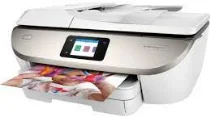
The HP ENVY Photo 7822 printer model belongs to the HP ENVY Photo 7800 printer series of multifunctional printers. The HP ENVY Photo 7822 also contains a printer driver compatible with the HP PCL 3 GUI print language. Besides, it requires the same driver to carry out automatic duplex printing on both sides of the paper. This category of printers can print, copy, scan, and fax documents. At the same time, it has an automatic document feeder (ADF) that can contain 35 sheets of plain paper.
HP ENVY Photo 7822 Drivers for Windows
344b35721f708134646aacf9545d4f763bfe9a4a65eaaf78df73efe241ada452fd6c1b5b35079ff2ce1068b0bef8ccd6d367d04a02b7bfec4f07cf7702da56f1837487decedd1fee40037a912fc720b8ac14664c4f5a48abfe08efd890ef409ff553ab1ed9b53b813cf4479bcbf64da595ae91b75188fe9e0c5d23131da58ef8295e4df666fa875808094cc76ae55c09d48cde9bf03432f7eef7830896974bb6c579f0c3e2b15c2cf0ca01a4e202172c2cb8c6cb03bda45aed2d6b0f4af517a994fb9f4a832efdd01ffc16af784c0ad85289fe87d75d0de11ff322566145eec8f60f54f607e9fd0d98b991b0f273a370b1c1112f794d818060416b2a65cf1f9256a177a1871b207548b705683228aa1673d266d2a663ddfa94f7022a12b390b6cc5c7d9a9f83c8f0133c25117e3ec2eddb63bb42f93ef455246cb578202c6e932f92fdda886ff61322267491d919546ee90c5c8a688eaf9d89f24a8cde5b5c842f92fdda886ff61322267491d919546ee90c5c8a688eaf9d89f24a8cde5b5c842f92fdda886ff61322267491d919546ee90c5c8a688eaf9d89f24a8cde5b5c84HP ENVY Photo 7822 Drivers for macOS
99e1d18847c64a405486ae34424f0a1c8d89920d17df86c45b6b0007f101d70aHP ENVY Photo 7822 Specifications
In terms of the physical dimensions of the printer, the width is about 453.5 mm, and the height is about 193.2 mm. It has a depth of 502.8 mm, while the net weight is about 7.60 kg. Concerning power, the machine has an HP auto-off technology, which serves as the energy-saving feature. It also contains an inbuilt universal power supply and an input voltage range between 100 and 240 volts for 50/60 Hz under ideal conditions.
The original print technology is the HP thermal inkjet print method which produces a color print rate of 10 pages per minute (ppm). On the other hand, printing black documents in that same mode runs at the speed of 15 ppm. The best print mode has an output quality level of 1200 x 1200 dots per inch (dpi). This quality output is possible, particularly when printing from a computer set. Its maximum print area is about 209.9 x 349.6 mm.
As a multifunctional printer, the scanning mode requires a contact image sensor (CIS) scanning element. Besides, the optimum scan resolution is also up to 1200 dpi through the preinstalled hardware component. It also has 256 levels of grayscale and a maximum flatbed scan size of 216 x 297 mm. Users can enjoy a full-year limited hardware warranty when using this device.
Technical Details
| Title | HP ENVY Photo 7822 Drivers |
|---|---|
| Device Type | All-in-one printer |
| Driver Version | Varies by driver and operating system |
| Available Downloads | Drivers |
| License | Free |
| Manufacturer | HP Inc. |