
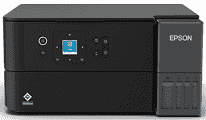
Epson L4360 Driver establishes communication between the computer and the printer during installation. A USB cable provides a direct connection, or the setup can use the wireless network. Once recognised, compatible applications can send print jobs and access the scanner. The software also passes selected page settings to the printer, helping the final output match the document.
Epson L4360 Drivers for Windows
03e473f7597f8757e8891d0db1e0f20d940ce55d66e42a9f12373bbc1032a8f57d38eb1a7194fc4cb36f931f0719118b1b9853f56b3f0273dc81e9c4a3db1f92f639a7dc9cf019878f7bbafd50bf8dd8e803670ddb36e1e32d8d11d17d7a4e14e296b0dd6f562045ca62037185b78ea08935c2397617465e6551a239e6f13b6cEpson L4360 Drivers for macOS
0a9986a0fcd3d24021c6eb4379bed78da0c4590205c5aebdcfd37292d04f1fd06c0d0ccbfa29c0fa64ba07350307cd6b37ae14abdd727335c4dacb2d7a6b9f86Epson L4360 Specifications
The Epson L4360 is a colour EcoTank all-in-one for printing, scanning, and copying. Printing comes from a PrecisionCore printhead supplied by refillable ink tanks. Pigment black ink handles text, and dye-based cyan, magenta, and yellow inks produce colour output. A 3.7 cm colour LCD and nearby buttons control copies, maintenance tasks, and wireless setup.
Maximum print resolution reaches 4,800 × 1,200 dpi. Under ISO testing, speeds reach 15 pages per minute in black and 8 pages per minute in colour. Scanning relies on a CIS flatbed with 1,200 × 2,400 dpi optical resolution. The same glass holds originals for standalone copies, one page at a time. Borderless output extends to A4 on compatible paper.
The rear tray takes up to 100 sheets, whereas printed pages collect in a 30-sheet output tray. Standard sizes include A4, A5, A6, Letter, B5, and B6. Envelopes and several photo sizes also feed from the rear. Paper weight ranges from 64 to 300 g/m², with the highest weight reserved for selected Epson photo media. Automatic two-sided printing is limited to A4 plain paper.
A nearby computer can connect through Hi-Speed USB. Wireless jobs can travel over dual-band Wi-Fi on 2.4 GHz or 5 GHz networks, and Wi-Fi Direct works without the home router. Phones and tablets can print through AirPrint, Mopria, Epson Connect, or Epson Smart Panel. With the trays closed, the body measures 375 × 347 × 187 mm and weighs about 5.2 kg without ink or the power cord. Copying uses up to 13 watts, dropping to 0.6 watt in sleep mode.
Technical Details
| Title | Epson L4360 Drivers |
|---|---|
| Device Type | All-in-one printer |
| Driver Version | Varies by driver and operating system |
| Available Downloads | Drivers |
| License | Free |
| Manufacturer | Seiko Epson Corporation |