
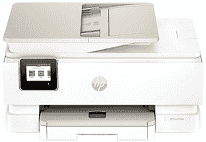
HP Envy Photo 7975 Driver helps the computer communicate correctly with this all-in-one printer during setup and use. After the driver is in place, the printer can receive print, scan, copy, and fax commands from supported applications. A USB cable gives a direct local connection. Wireless setup lets the same machine work over the network, so jobs are less likely to stall because the computer cannot identify the device.
HP Envy Photo 7975 Drivers for Windows
434a673d4d90247012223e4124d63785bc76aa7eaf53d9df76213f8ee64dbe24620068045902345004931235f980d18321eb73b2b9e83672a905b17b6e82367733a48d17157441a5f626bf8b2b5f85c04c1a524bacff1c548f899ad90978765ec11fe40d2b794ffeb0c9f87b6f22efe7b178646c583b58276f0dc4b24872778a83d239d64aa753b224ac1a5c229527fba7a264eb3653fb95af54a387b27b3b1bHP Envy Photo 7975 Specifications
The HP Envy Photo 7975 combines color printing with flatbed scanning, copying, and photo output. It uses one black cartridge and one tri-color cartridge rather than separate tanks for each color. A 2.7-inch capacitive touchscreen carries the local controls. The CIS scanner has two input paths: the glass takes individual originals, and the 35-sheet automatic document feeder moves through longer documents.
Document speed reaches 15 ISO pages per minute in black and 10 ISO pages per minute in color. For detailed color output, a computer can send 1200-dpi input for up to 4800 x 1200 optimized dpi. Hardware scan resolution tops out at 1200 x 1200 dpi. Copies run more slowly than prints, at up to 13 ISO cpm in black or 6 ISO cpm in color. Automatic duplexing is limited to compatible plain-paper sizes.
The main tray holds 125 sheets, but photo stock has its own 15-sheet tray. Finished pages collect in an output tray rated for 60 sheets, so it may need attention before a full input load has printed. Borderless output reaches 8.5 x 11 inches. Ordinary office sheets share the main tray with envelopes and cards. Brochure, presentation, and photo papers can also be loaded there.
USB 2.0 links the printer to one nearby computer. For wireless jobs, the dual-band 802.11a/b/g/n/ac connection carries network and mobile printing; no Ethernet port is fitted. With the body measuring 460 x 383 x 233 mm, the listed weight is about 8.12 kg. Power use during printing reaches 14 watts. HP rates the monthly maximum at 1,000 pages, although the recommended range is 300 to 400 pages.
Technical Details
| Title | HP Envy Photo 7975 Drivers |
|---|---|
| Device Type | All-in-one printer |
| Driver Version | Varies by driver and operating system |
| Available Downloads | Drivers |
| License | Free |
| Manufacturer | HP Inc. |