
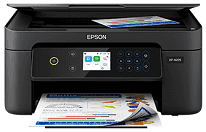
The Epson XP-4205 Driver makes it easy for the computer and printer to communicate with each other. This driver allows for compatibility and allows the printer to print, scan, and copy accurately. The driver also helps maintain quality output in supported operating systems. Therefore, users will have a more error-free experience when performing these tasks.
Epson XP-4205 Drivers for Windows
5af860474d01ece1b68664da13976890bdc8b00a854f81e8f0b4be2233ac10d8286404dea9589d994da0a91e6246865af7c0b707d20542381cbfddb115a1e099e1c5952483214c9917171a1eedd9feec7846b3d1e308402b0c32772ad306071bc3e1bfd2b67299fb683a17282f85c7fe95b7a702d20cbd214e1abd833eaef9b3180a81d0e184fc245546e5f7fc39027736594f04299a08ce50977b13f84b64fe6e5d23c64b3340a3885a44e0f76f2f847b6127f921b153afabf0c72b976e8fd6Epson XP-4205 Drivers for macOS
01206abe3e0569ab13cb2df0c57343719b50d859a88eb5e5b1cbc23386ab8d908491d226aa0c9c74f657a17e221aaad61cc3c5f43d3786316a9a1da8970e31704f199ba26e696f0ccb60e6a3cf621180beb3b223845595a7ffbb64a015b16acc319026e445ea179b27455527a34f991c0727f85cca0ee32f76c6d5a4406a2a82Specifications for Epson XP-4205
The Epson XP-4205 is a multifunctional home printer that provides functions of printing, copying, and scanning with the help of four colors – Cyan, Magenta, Yellow, and Black – using MicroPiezo inkjet technology with Epson Claria 232 ink cartridges. The maximum resolution is 5760 x 1440 dpi. It is applicable to everyday printouts such as homework papers, recipes, and borderless photographs. Ink cartridges are easy to replace, and the appropriate driver helps the computer identify the printer’s print settings.
The printer can print at the speed of 10.0 ISO ppm in black and 5.0 ISO ppm in color. Two-sided automatic printing is supported by the printer with the speed of 6.0 ISO ppm in black and 4.0 ISO ppm in color for the duplex pages. There is also Quiet Mode and collated printing. Duplexing is effective because it saves paper. Thus, special software is required to operate properly and handle the pages.
Paper handling is compatible with various sizes of the usual papers used in the household: Letter, A4, Legal, and No. 10 Envelopes, and even with sizes 8 x 10 inches, 5 x 7 inches, and 4 x 6 inches of photo media. Borderless printing is available on sizes Letter, A4, 8 x 10 inches, 5 x 7 inches, and 4 x 6 inches. The rear feed is compatible with 100 sheets of plain paper, and the output is 30 sheets of plain paper.
For connectivity, there are Hi-Speed USB, Wi-Fi 802.11b/g/n and Wi-Fi Direct options. As for mobile compatibility, there are Epson Smart Panel, Epson Creative Print, Epson Email Print, Epson Remote Print, Apple AirPrint, and Mopria. They allow direct setup from a computer or any mobile device. When configured in storage position, its size is 14.8 x 11.8 x 6.7 inches, and the weight is 9.5 lb.
Technical Details
| Title | Epson XP-4205 Drivers |
|---|---|
| Device Type | All-in-one printer |
| Driver Version | Varies by driver and operating system |
| Available Downloads | Drivers |
| License | Free |
| Manufacturer | Seiko Epson Corporation |