
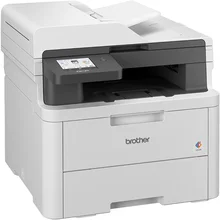
This is because the Brother DCP-L3560CDW Driver will allow for effective communication between your computer and the printer. In addition to ensuring proper installation, the driver allows for stability in connection and compatibility using USB, wireless, and network connections. The driver will further facilitate efficient printing and scanning of documents. This ensures that you can effectively use the printer.
Brother DCP-L3560CDW Drivers for Windows
fa2daaa10557e9482ef0ed4a371f6861a604cfd30d93c9c9bc5685c2eac02f7cf7d5f637e7573800301b51df2b041fa361836ae71b55854d8fec0a1f2eedde20f7d5f637e7573800301b51df2b041fa361836ae71b55854d8fec0a1f2eedde20Brother DCP-L3560CDW Drivers for macOS
3bac9ee7ab69c1c274ab5a54a6309f8cd4dd9a3d30fb991cfff30803a30fc38eBrother DCP-L3560CDW Drivers for Linux
258d7820e3cd7fab02692fca858deb32533f86464331911dca1312492755fa7862543127dd7bf6928db1e960cb1b4318a06aca5b368b2c6e1f0d4b5d7bb486d19c3a200db3dc7b2b3332dff8c5226b4f3ee560d20b2e1f4918b1faf7124517b2197f63a52e89b8744f5a3c2d843abb3b76d003d5d4830bdfe675c44841a6c72bd724746540a51f8286f2a318b47657227f7131d384a1a4f0475dacb7e3580f3ee74ef3a5529ebf3b26d6139ce15d75374a4538ba2efd48c28b209b0d705e5ec7Brother DCP-L3560CDW Specifications
Brother DCP-L3560CDW is a multifunctional printer that prints, scans, and copies. It uses Brother toners, and its print head type is LED. The printer doesn’t use liquid inks. Printing resolution is up to 600 x 600 dots per inch, and processing is up to 2,400 dots per inch for better printing of text and images.
Printing speeds for usual A4 paper reach 26 pages per minute in both monochrome and color modes. Letter-size output can be done at a speed of up to 27 ppm. Double-sided printing is possible for A4, Letter, Legal, Folio, Mexico Legal, and India Legal media formats. This function will save paper during usual office work.
Paper handling depends on a standard tray of 250 sheets that supports plain paper 80 gsm. The single-sheet feeder is responsible for envelopes, labels, glossy papers, etc. The face-down output tray is able to hold up to 150 sheets. No borderless printing is listed by Brother for this device, so drivers need to install printing solutions for standard pages.
There are Hi-Speed USB 2.0, Gigabit Ethernet, Dual-Band Wi-Fi, and Wi-Fi Direct. And there is mobile and network printing through AirPrint, Mopria, and Brother iPrint&Scan. There is also Brother BRAdmin Light, BRAdmin Professional 4 for Windows, and Web-Based Management available. All these options make it easier to match different ways of drivers’ installation.
It is 410 x 444 x 401 mm in size and weighs approximately 20.1 kilograms. There are 512 MB of memory available. 3.5″ Color Touch LCD screen allows controlling menus, 50 sheets ADF allows scanning and copying multi-page documents. With 26 ppm and 250-sheet input, it is good for usual home-office or small-office work.
Technical Details
| Title | Brother DCP-L3560CDW Drivers |
|---|---|
| Device Type | All-in-one printer |
| Driver Version | Varies by driver and operating system |
| Available Downloads | Drivers |
| License | Free |
| Manufacturer | Brother Industries, Ltd. |