
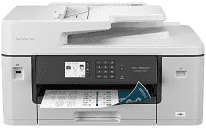
The Brother MFC-J6540DW Driver gives the computer access to the machine’s printing and scanning hardware over USB, Ethernet, or a wireless network. Print jobs can move across a wired or Wi-Fi connection, including the printer’s A3-capable output path. Scanning from a computer relies on the scanner driver, whether an original sits on the flatbed or passes through the automatic document feeder. Copying and faxing are built into the multifunction hardware, but those panel-operated functions do not depend on the computer for every job.
Brother MFC-J6540DW Drivers for Windows
1a49ac52b7a570e189cea33672d1ef66b3740a177477fb883a4d8b00bdb16a9b76ddc3d3ac00c5aeb5f775581dd2d992d55d4406acb173225462f73ae3dcbd7976ddc3d3ac00c5aeb5f775581dd2d992d55d4406acb173225462f73ae3dcbd790edce9170c3f46f065e52aa6335c093befa453212698a94c7d59fcfc5197fa7ec3db3f10657ece97a5dbae2b5490dd24b3691426d6add2c17e1cc1c2fc8b609d71169ef33cab91b5dc1e848ff483c40ad2eec7be44e69fcb0c084a590a79b49eBrother MFC-J6540DW Drivers for macOS
5d09788e98b2c9e91b297e4245f410a6e990743dddec3a740d0cf6a3735ae782Brother MFC-J6540DW Drivers for Linux
c1f72e7ed0e10737861c6b9f0503b277bf1b6435f58ca9d9e3231d2c27ee9687755e541ebf7fe1824edb963c01e1b062a37bd7b1c2fa38878f9bfbe6cb15594c9c3a200db3dc7b2b3332dff8c5226b4f3ee560d20b2e1f4918b1faf7124517b2197f63a52e89b8744f5a3c2d843abb3b76d003d5d4830bdfe675c44841a6c72bcda25534ea8e3018e7d46b970cb08b36084355adedc933aba0c8c7d03e903db901dc859f1978e645147ced5ec4b5448cc3e26b1c6d2f1104834f5891c0e17469d724746540a51f8286f2a318b47657227f7131d384a1a4f0475dacb7e3580f3ee74ef3a5529ebf3b26d6139ce15d75374a4538ba2efd48c28b209b0d705e5ec72ba3bffcf199fee6387cb79d6923214648db0f2df1c5a13f8f8f0a6fe0995c401404f2622e60470b4de25d0cdb4adc0f130ace6b380cc0d4b3d7714ad761c1aee28a8765f6637456d81ad1a56226e6857be2f1581fdcd9e4a5a4fbc4c42dd3450a4412b306b9ce2eb7e3ef4734a7b648f9561f525922b02541e98b545929dc2b82aa17ba2e331de1fcb34f0a839d27b9b193ac680d9742250a89e588a6bd56206c4e17c6dbcf263d9d08fb460ccd5b9f1a23fce79b30d0a41d96a224839322b2Brother MFC-J6540DW Specifications
The Brother MFC-J6540DW combines colour printing, scanning, copying, and faxing in an A3/Ledger-capable inkjet machine. Printing comes from a piezo head with 420 nozzles assigned to black and to each colour channel. Cyan, magenta, yellow, and black use separate cartridges. A 2.7-inch colour touchscreen sits on the control panel, backed by 256 MB of memory for onboard processing.
Maximum print resolution is 1200 × 4800 dpi. Brother rates both black and colour output at up to 28 ipm under its ISO test method. For two-sided documents, automatic duplexing is available on plain or recycled sheets from Letter and A4 through Legal, Ledger, and A3. The flatbed scans at up to 1200 × 2400 dpi, but originals moving through the ADF are read at up to 600 × 600 dpi.
The main paper tray holds 250 sheets and accommodates sizes ranging from A6 and photo paper to A3 or Ledger. Envelopes can also go into this tray. A separate manual slot takes one sheet at a time, which is useful for paper that should not remain in the main stack, including glossy or inkjet media. The 50-sheet ADF feeds multipage originals automatically. Printed Letter or A4 pages collect in a 100-sheet output area; capacity drops to 50 sheets for larger paper.
A nearby computer can connect over Hi-Speed USB 2.0, and wired network use is available through Ethernet. Wireless jobs can travel over the dual-band network, or Wi-Fi Direct can link a compatible device without relying on the usual router connection. The front USB host connection also reads flash drives for JPEG printing and scan-to-media tasks. Faxing uses a 33.6 Kbps Super G3 modem, with storage for 100 address-book entries. The machine weighs about 43.7 lb, or 19.8 kg.
Technical Details
| Title | Brother MFC-J6540DW Drivers |
|---|---|
| Device Type | All-in-one printer |
| Driver Version | Varies by driver and operating system |
| Available Downloads | Drivers |
| License | Free |
| Manufacturer | Brother Industries, Ltd. |