
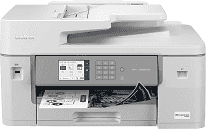
The Brother MFC-J6555DW Driver links the computer with the machine’s print, scan, copy, and fax functions. Print jobs reach the printer with the selected paper, quality, and layout settings intact. Scanning software can also communicate with the scanner when a compatible driver package is installed. The same driver setup can be used over the connections provided by the MFC-J6555DW, including local and network access.
Brother MFC-J6555DW Drivers for Windows
a155a2aa20ac9ed2dd24b8fe623f89eda18c27dc77b5ffef7b4f7c7e300ead6876ddc3d3ac00c5aeb5f775581dd2d992d55d4406acb173225462f73ae3dcbd7976ddc3d3ac00c5aeb5f775581dd2d992d55d4406acb173225462f73ae3dcbd790edce9170c3f46f065e52aa6335c093befa453212698a94c7d59fcfc5197fa7ec3db3f10657ece97a5dbae2b5490dd24b3691426d6add2c17e1cc1c2fc8b609d71169ef33cab91b5dc1e848ff483c40ad2eec7be44e69fcb0c084a590a79b49eBrother MFC-J6555DW Drivers for macOS
235aa7a7ba04443a435b72f5873abc96b494d89a58d9a02014a164562e0b02cfBrother MFC-J6555DW Drivers for Linux
bec5748259660a3dd7d9485ab3c67f0545c63afcbe1d9f11d20d24ec9c9c7a3b4d6a23f6c93cff7530b91bfd63e93c7f9076bdd9fb213e981a0f7413afd799229c3a200db3dc7b2b3332dff8c5226b4f3ee560d20b2e1f4918b1faf7124517b2197f63a52e89b8744f5a3c2d843abb3b76d003d5d4830bdfe675c44841a6c72bcda25534ea8e3018e7d46b970cb08b36084355adedc933aba0c8c7d03e903db901dc859f1978e645147ced5ec4b5448cc3e26b1c6d2f1104834f5891c0e17469d724746540a51f8286f2a318b47657227f7131d384a1a4f0475dacb7e3580f3ee74ef3a5529ebf3b26d6139ce15d75374a4538ba2efd48c28b209b0d705e5ec72ba3bffcf199fee6387cb79d6923214648db0f2df1c5a13f8f8f0a6fe0995c401404f2622e60470b4de25d0cdb4adc0f130ace6b380cc0d4b3d7714ad761c1aee28a8765f6637456d81ad1a56226e6857be2f1581fdcd9e4a5a4fbc4c42dd3450a4412b306b9ce2eb7e3ef4734a7b648f9561f525922b02541e98b545929dc2b82aa17ba2e331de1fcb34f0a839d27b9b193ac680d9742250a89e588a6bd56206c4e17c6dbcf263d9d08fb460ccd5b9f1a23fce79b30d0a41d96a224839322b2Brother MFC-J6555DW Specifications
The Brother MFC-J6555DW is a color inkjet all-in-one that can print, scan, copy, and fax documents as large as 11 by 17 inches. Printing comes from Brother MAXIDRIVE inkjet technology. The control panel carries a 3.5-inch color touchscreen, and a 50-page automatic document feeder takes care of longer originals. Scans can also be saved directly to a USB flash drive as JPEG, PDF, or TIFF files.
Black and color printing both reach up to 30 pages per minute, with print resolution up to 1200 by 4800 dpi. The flatbed scans at up to 1200 by 2400 dpi optically. Originals passing through the ADF are scanned at up to 600 by 600 dpi, so the glass is the better choice when the highest optical detail is needed. Automatic duplexing turns the paper for two-sided print jobs. Copy size can be adjusted from 25% to 400%, and borderless output extends to A3 paper.
Most paper sits in the 250-sheet main tray. A separate 100-sheet multipurpose tray is used for envelopes, cardstock, glossy sheets, and other specialty stock. Borderless jobs can use Letter, A4, Ledger, A3, A6, and supported photo sizes. The output tray takes up to 100 Letter or A4 sheets. With larger paper loaded, finished-page capacity drops to 50 sheets.
A wired setup can use Hi-Speed USB 2.0 or Ethernet. For wireless jobs, the printer can join either a 2.4 GHz or 5 GHz Wi-Fi network. Wi-Fi Direct gives compatible devices another route when a normal network connection is not being used. Brother lists a maximum monthly duty cycle of 40,000 pages, although the recommended monthly range is 250 to 3,500 pages. Power use is about 30 watts during copying, falling to roughly 5 watts in ready mode and 0.9 watt during sleep.
Technical Details
| Title | Brother MFC-J6555DW Drivers |
|---|---|
| Device Type | All-in-one printer |
| Driver Version | Varies by driver and operating system |
| Available Downloads | Drivers |
| License | Free |
| Manufacturer | Brother Industries, Ltd. |