
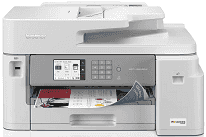
Brother MFC-J5855DW Driver gives the computer the software link needed to use the machine over USB, Ethernet, or a wireless network. Once that connection is set up, the computer can send print jobs and use the MFC-J5855DW for scanning. Fax functions can also be accessed from compatible computer software. The driver carries the commands and document data required for those functions instead of changing how the printer hardware itself operates.
Brother MFC-J5855DW Drivers for Windows
a155a2aa20ac9ed2dd24b8fe623f89eda18c27dc77b5ffef7b4f7c7e300ead6876ddc3d3ac00c5aeb5f775581dd2d992d55d4406acb173225462f73ae3dcbd7976ddc3d3ac00c5aeb5f775581dd2d992d55d4406acb173225462f73ae3dcbd790edce9170c3f46f065e52aa6335c093befa453212698a94c7d59fcfc5197fa7ec3db3f10657ece97a5dbae2b5490dd24b3691426d6add2c17e1cc1c2fc8b609d71169ef33cab91b5dc1e848ff483c40ad2eec7be44e69fcb0c084a590a79b49eBrother MFC-J5855DW Drivers for macOS
235aa7a7ba04443a435b72f5873abc96b494d89a58d9a02014a164562e0b02cfBrother MFC-J5855DW Drivers for Linux
88ad16cf2704b2ca3c37ddb4b0603a8d47a5869d15f59979cee2fc9717144870b70e27ab5c2081d63658843a9d04517cfd6111435b2cc4e93c0e6dc458cad7329c3a200db3dc7b2b3332dff8c5226b4f3ee560d20b2e1f4918b1faf7124517b2197f63a52e89b8744f5a3c2d843abb3b76d003d5d4830bdfe675c44841a6c72bcda25534ea8e3018e7d46b970cb08b36084355adedc933aba0c8c7d03e903db901dc859f1978e645147ced5ec4b5448cc3e26b1c6d2f1104834f5891c0e17469d724746540a51f8286f2a318b47657227f7131d384a1a4f0475dacb7e3580f3ee74ef3a5529ebf3b26d6139ce15d75374a4538ba2efd48c28b209b0d705e5ec72ba3bffcf199fee6387cb79d6923214648db0f2df1c5a13f8f8f0a6fe0995c401404f2622e60470b4de25d0cdb4adc0f130ace6b380cc0d4b3d7714ad761c1aee28a8765f6637456d81ad1a56226e6857be2f1581fdcd9e4a5a4fbc4c42dd3450a4412b306b9ce2eb7e3ef4734a7b648f9561f525922b02541e98b545929dc2b82aa17ba2e331de1fcb34f0a839d27b9b193ac680d9742250a89e588a6bd56206c4e17c6dbcf263d9d08fb460ccd5b9f1a23fce79b30d0a41d96a224839322b2Brother MFC-J5855DW Specifications
The Brother MFC-J5855DW is a color inkjet all-in-one for printing, scanning, copying, and faxing. Printing comes from Brother’s MAXIDRIVE inkjet system, fed by separate LC406 black, cyan, magenta, and yellow cartridges. The control panel carries a 3.5-inch color touchscreen, with 256 MB of memory inside the chassis. Above the flatbed, a 50-page automatic document feeder helps with multipage originals instead of placing every sheet on the glass.
Print resolution reaches 4800 x 1200 dpi. ISO output runs up to 30 pages per minute in black or color, and the first sheet is quick from the standard tray at 4.4 seconds for black or 4.6 seconds for color. Scanning is sharper from the glass at 1200 x 2400 dpi, while copy output stays at 600 x 600 dpi. Copies can be reduced or enlarged from 25% to 400%, which covers both small layout adjustments and larger duplicates.
Paper input comes from a 250-sheet tray and a 100-sheet multipurpose tray. Both feeds take sheets up to Ledger or A3, so wide paper does not require a separate rear-only path. Envelopes and small photo paper also load through these feeds. Automatic two-sided printing stops at Letter size. Borderless printing is limited to listed sizes, including Letter, A4, A6, 4 x 6, 5 x 7, and 5 x 8 inch paper.
A nearby computer can use Hi-Speed USB 2.0, and a wired network can use Ethernet. Wireless jobs can travel through dual-band Wi-Fi or Wi-Fi Direct when a router connection is not the preferred path. The front USB host port prints JPEG files from a memory stick and can save scans back to USB media. Mobile printing works through AirPrint, Mopria, Brother Mobile Connect, and Wi-Fi Direct. With the trays closed, the body measures 21.5 x 17.2 x 12.0 inches and weighs 39 lb.
Technical Details
| Title | Brother MFC-J5855DW Drivers |
|---|---|
| Device Type | All-in-one printer |
| Driver Version | Varies by driver and operating system |
| Available Downloads | Drivers |
| License | Free |
| Manufacturer | Brother Industries, Ltd. |