
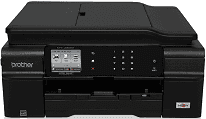
The Brother MFC-J650DW printer model has impressive specifications that make it suitable for commercial and private uses. The printer runs on an inkjet print technology for a modern method that optimizes printing resources. The monochrome printing requires one piezo component with 210 nozzles while color printing uses three such parts. The internal memory storing capacity is about 128 MB of RAM that combines with its processor. Both of these components ensure good speed and impressive quality of output.
Brother MFC-J650DW Drivers for Windows
5295a347086f950f4cf84c70fc361b2d2c8580014044fdd41092cadd24c59f2aa7fa456aff4609c08a2a71b64cb322b7c425f1d136d24c60b5e7fc02b2d148bcBrother MFC-J650DW Drivers for macOS
dc886520244b33cfeb818312f6ee9b2f31d40a7639309d8a58f522372ac5f9786a9ef2865964ff4918dd1441876a80485fb8c329df36aa8d6680deff2eecd53ebe276896da6d01ab40093bee2ee908216d56ce78a84a40bc32be653c76bc819d949467d5fd874da4f4bcf9028483495f8319aad70483dbb26c2c4db964fbc8a71abf02206636ba656cf2ac87055b7abf22fa7f28e6658ca47be927e79dfbe7a05a7267150b83ee885c1eaea15b7033b2cce24fd9c0ff9335ad5e5e43d2a9371259553d65e3e1fd0efacf7816fbbefce981bc6f2b27ffc20c6b452dba4c4a8d7cf76b3ab85aaf47427b46287fda88801eb90d14cd63b23612824ff1513e658f92a47f2e6b9b5d9f4dc7bf154292f2e691176be4724779a06d00497673134f1a501abf02206636ba656cf2ac87055b7abf22fa7f28e6658ca47be927e79dfbe7a047e26a481968bd3ae74b6d77b69c018982a7e0451375ed6990cb18cfd6c92b598ff2963b6485efab4853dac5e0bff1eb74fa2e47ddc4f9470e79efcb9cbb4e19e33bd724f5c43f06fbeb1a284ac26fe93f3a4bc408e15ef6800440e4d74c00a1868ee1de715a54d657a791d0077a3621bbc02efe2d1d5e69a9b3472a42f1aad0Brother MFC-J650DW Drivers for Linux
0e71e48ab847bb638328de8a93326563b50601b651920de23f86b356b3e84a2f16578ab6415f8b77b1a02783822d3455b63c66706a3f6295b0d4230a6c95072f396b671dfe8b6fbd47475b6f87e4012d93a9349b33d39c60f54787d979b80bba1797a18e9a3d462bcf950e6cd0e823b3c11c350b37a8d2c71388502eede662cb027b73648722ac8c8eb1a9c419d284a6562cc763feac9740a2b75a683b0929727d7dcbe8349ae4d4ab816e4551017f2f1fd9fd6bf3f4f3c570fbd9576248dd9f4225e91dd7f7d0ba2a202f616b15b669be7800c271a7d25efed94191f71fc4508bd395b8a25a385eb4a5e2770d4b10b17735203006b7a90a6879a0ef69e5fe4df71dadda535bb90dbfaf88fd603897f96e8b09a2f3ae9bd4e2daafb925e896e24082d824222ec7a7646309260fd661387ca1aa5dc1ffe851db7bbefe5271b755Brother MFC-J650DW Specifications
The control panel of this model of the printer contains a liquid crystal display (LCD) of 2.7 inches diagonal size. This part has a TFT color touchscreen for the LCD and creates a user-friendly experience and ease. The power source that applies to the device is a range between 220 and 240 volts at 50/60 Hz. The recommended temperature range by the Brother company is between 10 and 35°C during operations. On the other hand, the best print quality requires a temperature range between 20 and 33°C.
The power consumption of the Brother MFC-J650DW printer is a function of the processes which may include printing and copying. The copying mode requires approximately 18 watts, and the active mode is about 4 watts. On the other hand, the sleep mode uses approximately 1.1 watts while the off mode takes about 0.2 watts. The printer height is about 180 mm, the depth is about 374 mm, and the width is about 410 mm.
The weight of the printer, on the other hand, is about 9.2 kg, which is particular for this model of the printer. The MCF series of Brother printers are characterized by multiple functions that may include printing and copying. The printer also supports an automatic document feeder (ADF) which can hold about 20 pages of plain sheets. The maximum weight of such paper size should not exceed 80 gsm or 20 lbs.
Technical Details
| Title | Brother MFC-J650DW Drivers |
|---|---|
| Device Type | All-in-one printer |
| Driver Version | Varies by driver and operating system |
| Available Downloads | Drivers |
| License | Free |
| Manufacturer | Brother Industries, Ltd. |