
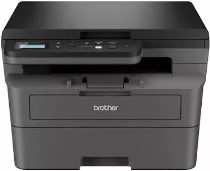
Brother HL-L2464DW Driver lets the computer identify this monochrome laser multifunction printer and send jobs to it correctly. After installation, the system can use the machine for printing, scanning, and copying through a wired connection or over the wireless network. Fax setup is not part of this model because the hardware does not include fax support. The driver carries the selected print, scan, and copy settings through to each device task.
Brother HL-L2464DW Drivers for Windows
73998ad3904225e14aa6310e1574d3e4218c9a6f09d7e51a9bff12cdcad54c54df159124802c2fbd77835e50754f1c7c1e30ee7f9c52268de659ce5e0057d06edf159124802c2fbd77835e50754f1c7c1e30ee7f9c52268de659ce5e0057d06e71169ef33cab91b5dc1e848ff483c40ad2eec7be44e69fcb0c084a590a79b49eBrother HL-L2464DW Drivers for macOS
2d4593e907bdb615508d706557592b4d862250f626c4bb28449e8d98d566baccBrother HL-L2464DW Drivers for Linux
8e75873864996fa3d5dc25fb9aa6d1e0555e7f7a98d6f2ebda9e6def8092bef7254f3c6ae1c917dfd61e5dc88b36a17dded151d0b7cde85146f4a62a6d18e9339c3a200db3dc7b2b3332dff8c5226b4f3ee560d20b2e1f4918b1faf7124517b2197f63a52e89b8744f5a3c2d843abb3b76d003d5d4830bdfe675c44841a6c72bcda25534ea8e3018e7d46b970cb08b36084355adedc933aba0c8c7d03e903db901dc859f1978e645147ced5ec4b5448cc3e26b1c6d2f1104834f5891c0e17469d724746540a51f8286f2a318b47657227f7131d384a1a4f0475dacb7e3580f3ee74ef3a5529ebf3b26d6139ce15d75374a4538ba2efd48c28b209b0d705e5ec72ba3bffcf199fee6387cb79d6923214648db0f2df1c5a13f8f8f0a6fe0995c401404f2622e60470b4de25d0cdb4adc0f130ace6b380cc0d4b3d7714ad761c1ae82aa17ba2e331de1fcb34f0a839d27b9b193ac680d9742250a89e588a6bd56206c4e17c6dbcf263d9d08fb460ccd5b9f1a23fce79b30d0a41d96a224839322b2Brother HL-L2464DW Specifications
The Brother HL-L2464DW is a monochrome laser multifunction printer with printing, flatbed scanning, and copying, but no fax function. Its electrophotographic engine works with a separate toner cartridge and DR2530 drum unit. Brother lists 128 MB of memory, a 600 MHz processor, and GDI printing for this model. A button-based control panel handles copy and scan settings without touchscreen hardware.
Black output runs at up to 28 pages per minute on A4 paper and 30 pages per minute on Letter. From ready mode, the first page appears in about eight and a half seconds. Print resolution reaches 1200 x 1200 dpi, while automatic duplexing handles plain-paper two-sided jobs. Scanning uses the flatbed at up to 1200 x 1200 dpi optically, with interpolation up to 19200 x 19200 dpi through software.
Paper input comes through a 250-sheet cassette for ordinary plain paper, together with a one-sheet manual feed slot for envelopes and thicker media. Finished sheets collect in a face-down output area rated for up to 100 sheets. The cassette accepts A4, Letter, Legal, Folio, Executive, A5, A6, B5, and B6 sizes, while the manual slot also takes supported custom media types and weights.
Connections include Hi-Speed USB 2.0, dual-band wireless networking, and Wi-Fi Direct, while mobile printing works through AirPrint, Mopria, and Brother Mobile Connect. The closed body measures about 410 x 399 x 272 mm and weighs about 10.1 kg. Power use sits near 460 W while printing and 43 W in ready mode, then drops to roughly 4 W in sleep and below 1 W in deep sleep.
Technical Details
| Title | Brother HL-L2464DW Drivers |
|---|---|
| Device Type | All-in-one printer |
| Driver Version | Varies by driver and operating system |
| Available Downloads | Drivers |
| License | Free |
| Manufacturer | Brother Industries, Ltd. |