
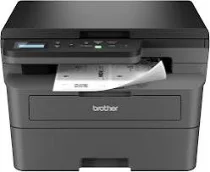
Brother HL-L2465DW Driver lets the computer identify this monochrome laser multifunction printer and send jobs to it correctly. After installation, the system can use the machine for printing, flatbed scanning, and copying. Job commands can travel through USB or over the wireless network. Fax setup is not part of this model because the hardware does not include fax support. The driver carries the selected print, scan, and copy settings through to each device task.
Brother HL-L2465DW Drivers for Windows
1a5c46b7bfff55280ad8775247c9391f4d1d387920142f0962862645482b6c53df159124802c2fbd77835e50754f1c7c1e30ee7f9c52268de659ce5e0057d06edf159124802c2fbd77835e50754f1c7c1e30ee7f9c52268de659ce5e0057d06e71169ef33cab91b5dc1e848ff483c40ad2eec7be44e69fcb0c084a590a79b49eBrother HL-L2465DW Drivers for macOS
2d4593e907bdb615508d706557592b4d862250f626c4bb28449e8d98d566baccBrother HL-L2465DW Drivers for Linux
cea05e83b5c94f5557029717e091ab0de5c7dde2df3faf974d9d309ee4e93ab213c250f21581826705cd3f63d3ee2a785cdc5e7276f43ae4d6f7f4033c6754419c3a200db3dc7b2b3332dff8c5226b4f3ee560d20b2e1f4918b1faf7124517b2197f63a52e89b8744f5a3c2d843abb3b76d003d5d4830bdfe675c44841a6c72bcda25534ea8e3018e7d46b970cb08b36084355adedc933aba0c8c7d03e903db901dc859f1978e645147ced5ec4b5448cc3e26b1c6d2f1104834f5891c0e17469d724746540a51f8286f2a318b47657227f7131d384a1a4f0475dacb7e3580f3ee74ef3a5529ebf3b26d6139ce15d75374a4538ba2efd48c28b209b0d705e5ec72ba3bffcf199fee6387cb79d6923214648db0f2df1c5a13f8f8f0a6fe0995c401404f2622e60470b4de25d0cdb4adc0f130ace6b380cc0d4b3d7714ad761c1ae82aa17ba2e331de1fcb34f0a839d27b9b193ac680d9742250a89e588a6bd56206c4e17c6dbcf263d9d08fb460ccd5b9f1a23fce79b30d0a41d96a224839322b2Brother HL-L2465DW Specifications
The Brother HL-L2465DW is a compact monochrome laser multifunction printer. It prints, copies, and scans from the flatbed glass, but it does not have fax hardware. The black laser engine uses a separate toner cartridge and drum unit. Brother lists TN830, TN830XL, TN830V, and TN830XL twin-pack cartridges for toner, with the DR830 as the matching drum. The control panel stays button-based instead of using a touchscreen. Inside the body, 128 MB of memory works with a 600 MHz processor for GDI printing.
Black print speed reaches 30 pages per minute on Letter paper. On A4 paper, the speed reaches 28 pages per minute. From ready mode, the first page leaves the standard tray in less than 8.5 seconds. Print resolution reaches 1200 x 1200 dpi. Automatic two-sided printing works on Letter, Legal, Mexico Legal, and India Legal paper. For copies, the machine produces 600 x 600 dpi output and can scale originals from 25% to 400%. Copy sorting is also part of the standalone copy menu.
Scanning starts from the flatbed glass, which accepts color and black-and-white originals. Optical scan resolution reaches up to 1200 x 1200 dpi from the glass. The scanner utility can raise interpolated resolution to 19200 x 19200 dpi. The scan area reaches up to 8.5 inches wide and 11.8 inches long. No automatic document feeder is fitted, so each page in a multi-page original must be placed on the glass separately.
Paper feeds from a 250-sheet cassette for regular tray work. A one-sheet manual slot gives envelopes, labels, bond paper, thick paper, recycled paper, and letterhead a separate feed path. Finished pages stack in the 100-sheet face-down output tray. A rear face-up exit releases one sheet at a time. A nearby computer can use Hi-Speed USB 2.0. Wireless jobs can run over dual-band Wi-Fi or Wi-Fi Direct, and this exact model has no wired Ethernet port. With the covers and trays closed, the unit measures 16.1 x 15.7 x 10.7 inches and weighs 22.2 pounds.
Technical Details
| Title | Brother HL-L2465DW Drivers |
|---|---|
| Device Type | All-in-one printer |
| Driver Version | Varies by driver and operating system |
| Available Downloads | Drivers |
| License | Free |
| Manufacturer | Brother Industries, Ltd. |