
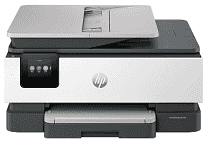
HP OfficeJet Pro 8139 Driver gives the computer the software link it needs to use the printer’s print, scan, copy, and fax functions. A USB cable can serve one nearby computer, and Ethernet provides a wired network connection. Wireless printing can use the local Wi-Fi network instead. Once the driver recognizes the hardware correctly, applications can send print data and access the scanner from the computer.
HP OfficeJet Pro 8139 Drivers for Windows
9ae1442c79ed7dc5fca3e645c6175f857e99e2df47f70ce0f5f3ea41cde540fc620068045902345004931235f980d18321eb73b2b9e83672a905b17b6e82367733a48d17157441a5f626bf8b2b5f85c04c1a524bacff1c548f899ad90978765ec11fe40d2b794ffeb0c9f87b6f22efe7b178646c583b58276f0dc4b24872778aa211b51894cab560a391827659181bc2316121c7f452e20acada50473e42a79f3c6881a3b77ba0e7042f41e647f27001481724678f084959e9f78d3958ab895e1eea95f7369b1769c558b5241c1699e168c1cd0ecaa3182748ff613c4407316f252f429b15fa67d41bb14261852159a3cedc31429ed4e0f4b0f8d77f325cd9f7b334974dff8c24b8ce9b24aabde122922f969419b3f2b9f6be4ce9e605b888c9HP OfficeJet Pro 8139 Specifications
The HP OfficeJet Pro 8139 is a colour thermal-inkjet all-in-one for printing, scanning, copying, and faxing. It uses four separate cartridges for black, cyan, magenta, and yellow ink. A 2.7-inch capacitive colour touchscreen sits on the control panel. Behind it, 512 MB of memory and a 1.2 GHz processor run HP PCL3 GUI print jobs.
Black documents print at up to 20 ISO ppm, compared with 10 ISO ppm for colour. Draft settings raise those figures to 29 ppm and 25 ppm. A first black page takes about 15 seconds from ready state; colour takes about 18 seconds. Automatic duplexing deals with two-sided print jobs without manual page turning. Black resolution reaches 1200 x 1200 rendered dpi, and colour output can use up to 4800 x 1200 optimized dpi.
Scanning uses a CIS flatbed and a 35-sheet automatic document feeder. The feeder is one-sided, so duplex originals need manual handling. Scan resolution reaches 1200 dpi, and the ADF accepts originals as large as 215.9 x 355.6 mm. Copy resolution reaches 600 dpi, with enlargement or reduction from 25% to 400%. Up to 99 copies can be set for one job. The same machine also contains colour fax hardware.
Paper goes into a 225-sheet input tray, and the output tray holds up to 60 finished sheets. Standard document sizes range from A4 down to A6 and B5. Photo paper, cards, envelopes, and supported custom sizes use the same paper system. A nearby computer can connect by Hi-Speed USB 2.0, and Ethernet provides a wired network connection. Wireless jobs can travel over dual-band 802.11a/b/g/n/ac Wi-Fi or Wi-Fi Direct without using the main network. With the printer closed, the body measures 460.3 x 337.5 x 233 mm and weighs 8.0 kg.
Technical Details
| Title | HP OfficeJet Pro 8139 Drivers |
|---|---|
| Device Type | All-in-one printer |
| Driver Version | Varies by driver and operating system |
| Available Downloads | Drivers |
| License | Free |
| Manufacturer | HP Inc. |