
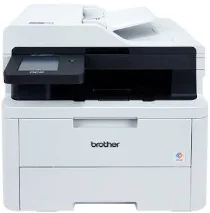
Brother DCP-L3568CDW Driver helps the computer send print and scan commands to this colour LED multifunction machine. After installation, the operating system can identify the unit for printing, scanning, and copying. A local setup can use USB, while shared access can run through wired Ethernet or wireless networking. The driver keeps those jobs readable to the Brother machine, so pages and scanned files pass through the selected connection correctly.
Brother DCP-L3568CDW Drivers for Windows
fa2daaa10557e9482ef0ed4a371f6861a604cfd30d93c9c9bc5685c2eac02f7cf7d5f637e7573800301b51df2b041fa361836ae71b55854d8fec0a1f2eedde20f7d5f637e7573800301b51df2b041fa361836ae71b55854d8fec0a1f2eedde20b15919b465d9b8479440f7076ac5026e2b6f3dfb04f30d6de4ffca85d9a976b86eddedfff4131bc903d581f6dc86a8518e1c82980a4cd38b4396c4c1bb1338d3ee2cabe92d46f7f6804a469fbdf46bfefbc58df649a126f936d83c3cc990a4ef5f3ad9dd0475f7524f0e489aa7076da168c228bcd22031394a53fad4b9a2573f71169ef33cab91b5dc1e848ff483c40ad2eec7be44e69fcb0c084a590a79b49eBrother DCP-L3568CDW Drivers for macOS
3bac9ee7ab69c1c274ab5a54a6309f8cd4dd9a3d30fb991cfff30803a30fc38eBrother DCP-L3568CDW Drivers for Linux
74d446ee800e7c5066594af27c92449cf2d8ac2e5c861e4b95a7f064ecead420f45f072a3a85d42ea17b9c8b5c1d1475ec735eab80c475ec1f13c021c33097549c3a200db3dc7b2b3332dff8c5226b4f3ee560d20b2e1f4918b1faf7124517b2197f63a52e89b8744f5a3c2d843abb3b76d003d5d4830bdfe675c44841a6c72bcda25534ea8e3018e7d46b970cb08b36084355adedc933aba0c8c7d03e903db901dc859f1978e645147ced5ec4b5448cc3e26b1c6d2f1104834f5891c0e17469d724746540a51f8286f2a318b47657227f7131d384a1a4f0475dacb7e3580f3ee74ef3a5529ebf3b26d6139ce15d75374a4538ba2efd48c28b209b0d705e5ec72ba3bffcf199fee6387cb79d6923214648db0f2df1c5a13f8f8f0a6fe0995c401404f2622e60470b4de25d0cdb4adc0f130ace6b380cc0d4b3d7714ad761c1ae82aa17ba2e331de1fcb34f0a839d27b9b193ac680d9742250a89e588a6bd56206c4e17c6dbcf263d9d08fb460ccd5b9f1a23fce79b30d0a41d96a224839322b2Brother DCP-L3568CDW Specifications
The DCP-L3568CDW is a colour LED multifunction printer for printing, scanning, and copying. Fax functions remain with the related MFC model. Its electrophotographic LED engine works with 512 MB of memory and 220 to 240 V AC power. Local control uses a 3.5-inch TFT colour touchscreen. The flatbed sits below a 50-sheet automatic document feeder, which can feed multi-page originals for scan or copy jobs.
Physical print resolution is 600 x 600 dpi. Best output is listed as 2400 dpi quality through 600 x 2400 processing. Monochrome and colour pages both run at up to 26 ppm on A4 or 27 ppm on Letter. Automatic two-sided printing reaches 10 sides per minute. From ready mode, the first page exits in less than 13.5 seconds for either monochrome or colour output. Printer emulation covers PCL, BR-Script3, PDF, and XPS.
Copying works at 600 x 600 dpi. Stack copying can produce up to 999 pages, and resizing moves from 25 percent to 400 percent in one-percent steps. From ready mode, the first copy takes less than 14.5 seconds in monochrome or 15.5 seconds in colour. Scanning reaches 1200 x 1200 dpi from the glass. Originals sent through the ADF scan at 600 x 600 dpi, with interpolation available up to 19200 x 19200 dpi.
The paper tray holds 250 sheets. The one-sheet manual slot takes bond paper, labels, envelopes, and glossy paper. Tray sizes include A4, Letter, Legal, Folio, Executive, A5, A6, B5, B6, India Legal, Mexico Legal, 16K, and A4 Short. Finished pages collect in a 150-sheet face-down output area, or leave through the one-sheet face-up path. A nearby computer can connect through Hi-Speed USB 2.0. Network setup can use Gigabit Ethernet, dual-band wireless LAN, or Wi-Fi Direct.
Technical Details
| Title | Brother DCP-L3568CDW Drivers |
|---|---|
| Device Type | All-in-one printer |
| Driver Version | Varies by driver and operating system |
| Available Downloads | Drivers |
| License | Free |
| Manufacturer | Brother Industries, Ltd. |