
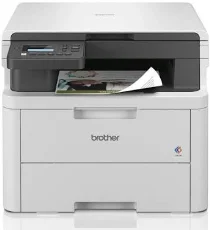
Brother DCP-L3520CDW Driver lets the computer send print and scan commands to this colour multifunction machine correctly. After installation, the system can recognize the Brother unit for printing, scanning, and copying. A nearby computer may use USB, while wireless jobs travel through the network connection. The driver keeps those commands readable, reducing recognition problems and output errors.
Brother DCP-L3520CDW Drivers for Windows
055d49b3ac8372d7474be0ed12b4e28da27d8ad10e3a53b49456993c2b0fcea3f7d5f637e7573800301b51df2b041fa361836ae71b55854d8fec0a1f2eedde20f7d5f637e7573800301b51df2b041fa361836ae71b55854d8fec0a1f2eedde20b15919b465d9b8479440f7076ac5026e2b6f3dfb04f30d6de4ffca85d9a976b86eddedfff4131bc903d581f6dc86a8518e1c82980a4cd38b4396c4c1bb1338d3ee2cabe92d46f7f6804a469fbdf46bfefbc58df649a126f936d83c3cc990a4ef5f3ad9dd0475f7524f0e489aa7076da168c228bcd22031394a53fad4b9a2573f71169ef33cab91b5dc1e848ff483c40ad2eec7be44e69fcb0c084a590a79b49eBrother DCP-L3520CDW Drivers for macOS
3c149ba81bae509d4e7d433701c869b2b6e4e3eb3d91ff8e26be43698f17989cBrother DCP-L3520CDW Drivers for Linux
d724746540a51f8286f2a318b47657227f7131d384a1a4f0475dacb7e3580f3e7fa7da93f5760f4c5341b22227ba60c303474f65d545a542af325983882edab19c3a200db3dc7b2b3332dff8c5226b4f3ee560d20b2e1f4918b1faf7124517b2197f63a52e89b8744f5a3c2d843abb3b76d003d5d4830bdfe675c44841a6c72bcda25534ea8e3018e7d46b970cb08b36084355adedc933aba0c8c7d03e903db901dc859f1978e645147ced5ec4b5448cc3e26b1c6d2f1104834f5891c0e17469d724746540a51f8286f2a318b47657227f7131d384a1a4f0475dacb7e3580f3ee74ef3a5529ebf3b26d6139ce15d75374a4538ba2efd48c28b209b0d705e5ec72ba3bffcf199fee6387cb79d6923214648db0f2df1c5a13f8f8f0a6fe0995c401404f2622e60470b4de25d0cdb4adc0f130ace6b380cc0d4b3d7714ad761c1ae82aa17ba2e331de1fcb34f0a839d27b9b193ac680d9742250a89e588a6bd56206c4e17c6dbcf263d9d08fb460ccd5b9f1a23fce79b30d0a41d96a224839322b2Brother DCP-L3520CDW Specifications
The Brother DCP-L3520CDW is a colour LED multifunction printer with print, scan, and copy functions. Fax hardware remains with related MFC models. Printing comes from an electrophotographic LED engine backed by 512 MB of memory. The control panel uses a 20-character, two-line display. Scanning relies on the flatbed glass only, since the ADF listed for higher models is not part of this exact machine. Power input is 220 to 240 V AC.
Print output is 600 x 600 dpi, with 2400 dpi class quality produced at 600 x 2400. Monochrome and colour pages both run at up to 18 ppm on A4 or 19 ppm on Letter. Automatic two-sided printing reaches 7 sides per minute. From ready mode, the first print comes out in less than 15 seconds at 23°C and 230 V. Printer emulation covers PCL5e, PCL5c, PCL6, BR-Script3, PDF, and XPS.
The flatbed scans at up to 1200 x 1200 dpi. Through the scanner utility, interpolated resolution can reach 19200 x 19200 dpi. Scan width goes up to 210 mm, and the glass accepts originals up to 215.9 mm wide and 300 mm long. Copying works at 600 x 600 dpi. Sort copying is available, stack copying stops at 99 pages, and scaling runs from 25% to 400% in one-percent steps.
The standard tray holds up to 250 sheets of 80 g/m2 plain paper. It accepts A4, Letter, Legal, Folio, A5, A6, B5, B6, and Executive sizes. Manual feed takes one sheet at a time. That slot also handles envelopes, labels, and media from 76.2 to 216 mm wide. A nearby computer can connect through Hi-Speed USB 2.0. Wireless printing runs through dual-band wireless LAN or Wi-Fi Direct, while Ethernet is not listed for this model. With the trays closed, the machine measures 410 x 355 x 444 mm and weighs 18.6 kg.
Technical Details
| Title | Brother DCP-L3520CDW Drivers |
|---|---|
| Device Type | All-in-one printer |
| Driver Version | Varies by driver and operating system |
| Available Downloads | Drivers |
| License | Free |
| Manufacturer | Brother Industries, Ltd. |