
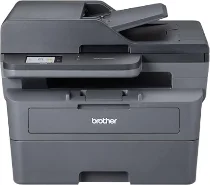
Brother DCP-L2600DW Driver sets up computer communication with this monochrome laser multifunction printer for printing, scanning, and copying. After installation, the operating system can identify the Brother DCP-L2600DW and route each job to the correct function. A nearby computer can connect through USB for a direct link. Wireless setup lets print jobs and scan requests move through the network without a printer cable.
Brother DCP-L2600DW Drivers for Windows
27cb85da20d82ece9f1224fef16d2ad504a7b4f3d5de7aacbfd05cba8a3e51db2ef107682e8520429612da8e37519ed2e47dfedc53e71e7561f6e59e05d55a1a2ef107682e8520429612da8e37519ed2e47dfedc53e71e7561f6e59e05d55a1a0917273bb5bc10ee4775f36bd98bd05152835bf5370614cf5a803ffa9260b0adBrother DCP-L2600DW Drivers for macOS
2d4593e907bdb615508d706557592b4d862250f626c4bb28449e8d98d566baccBrother DCP-L2600DW Drivers for Linux
a66718a723217e879ed47081ea36f30f538dae86e58e8151e171beb5aff74aa3e1cf1199f399790147f7fffc04d15c982b2dc5ef7e9a8f4e4a6d0f8cd0afc1209c3a200db3dc7b2b3332dff8c5226b4f3ee560d20b2e1f4918b1faf7124517b2197f63a52e89b8744f5a3c2d843abb3b76d003d5d4830bdfe675c44841a6c72bcda25534ea8e3018e7d46b970cb08b36084355adedc933aba0c8c7d03e903db901dc859f1978e645147ced5ec4b5448cc3e26b1c6d2f1104834f5891c0e17469d724746540a51f8286f2a318b47657227f7131d384a1a4f0475dacb7e3580f3ee74ef3a5529ebf3b26d6139ce15d75374a4538ba2efd48c28b209b0d705e5ec72ba3bffcf199fee6387cb79d6923214648db0f2df1c5a13f8f8f0a6fe0995c401404f2622e60470b4de25d0cdb4adc0f130ace6b380cc0d4b3d7714ad761c1ae82aa17ba2e331de1fcb34f0a839d27b9b193ac680d9742250a89e588a6bd56206c4e17c6dbcf263d9d08fb460ccd5b9f1a23fce79b30d0a41d96a224839322b2Brother DCP-L2600DW Specifications
The Brother DCP-L2600DW is a monochrome laser multifunction printer with print, scan, and copy hardware. Printing uses an electrophotographic engine with 128 MB memory, while the control panel carries a monochrome two-line LCD. The flatbed scanner relies on CIS hardware, and the listed power supply is AC 100 V at 50/60 Hz. This unit has no automatic document feeder, fax function, NFC, or wired Ethernet.
Printing reaches up to 1200 x 1200 dpi. A4 simplex output runs at about 28 ppm, while automatic duplex output reaches about 15 pages per minute. First print time is 9.5 seconds or less from ready mode. Copying also reaches about 28 ppm for A4 simplex pages. Copy resolution is 600 x 600 dpi, with up to 99 copies, 256 grayscale levels, and 25 to 400 percent scaling.
Scanning reaches 1200 x 1200 dpi optical resolution, while Windows TWAIN interpolation can extend to 19200 x 19200 dpi. The flatbed reads up to 204 mm across an A4 original. Paper input comes through a 250-sheet tray for 60 to 163 gsm media. One sheet feeds through the manual slot with 60 to 230 gsm media. Face-down output holds 100 sheets, and the rear face-up path takes one sheet.
The standard tray accepts A4, Letter, B5, A5, A5 long-edge, B6, A6, and postcards. Manual feeding adds supported envelopes and custom sizes from 76.2 to 215.9 mm wide and 127 to 355.6 mm long. Connections include Hi-Speed USB 2.0 and IEEE 802.11 a/b/g/n wireless LAN, while physical measurements are 410 mm wide, 399 mm deep, and 272 mm high, with a listed weight of about 10.1 kg.
Technical Details
| Title | Brother DCP-L2600DW Drivers |
|---|---|
| Device Type | All-in-one printer |
| Driver Version | Varies by driver and operating system |
| Available Downloads | Drivers |
| License | Free |
| Manufacturer | Brother Industries, Ltd. |