
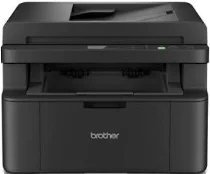
Brother DCP-L1660W Driver helps the computer identify this wireless monochrome laser multifunction printer before print jobs move to the machine. Desktop printing and scanning need proper device communication before the software can reach the printer and flatbed. Copying still runs from the printer’s own controls, but the same setup keeps the machine recognized for computer-based tasks. For wireless use, the printer also has to join the correct network before jobs move with fewer command or connection errors.
Brother DCP-L1660W Drivers for Windows
fb36c922d4ce7cbc5e86302ff82841377ad4fefc78bc2191730537df16770472469eac6f0d73d86e694e2b9d1dbcf73b6030a82d0fd41faf7c9cbc3bb7a9c1df469eac6f0d73d86e694e2b9d1dbcf73b6030a82d0fd41faf7c9cbc3bb7a9c1df71169ef33cab91b5dc1e848ff483c40ad2eec7be44e69fcb0c084a590a79b49eBrother DCP-L1660W Drivers for macOS
45384ef6a3a625c9c0c094dd5bd1e775ce171e97b3043dc3b03b5c8abc7f5a54Brother DCP-L1660W Drivers for Linux
7bcb81651cf1de26feb5d34d0df0cea8cbcb5bc6c1031d1a65b1c4cbaaee289846b5f22ecf960960981a86c41b27d9387bbea2cfe7a4f4db30505bde0d4d99989c3a200db3dc7b2b3332dff8c5226b4f3ee560d20b2e1f4918b1faf7124517b2197f63a52e89b8744f5a3c2d843abb3b76d003d5d4830bdfe675c44841a6c72bcda25534ea8e3018e7d46b970cb08b36084355adedc933aba0c8c7d03e903db901dc859f1978e645147ced5ec4b5448cc3e26b1c6d2f1104834f5891c0e17469d724746540a51f8286f2a318b47657227f7131d384a1a4f0475dacb7e3580f3ee74ef3a5529ebf3b26d6139ce15d75374a4538ba2efd48c28b209b0d705e5ec72ba3bffcf199fee6387cb79d6923214648db0f2df1c5a13f8f8f0a6fe0995c401404f2622e60470b4de25d0cdb4adc0f130ace6b380cc0d4b3d7714ad761c1ae82aa17ba2e331de1fcb34f0a839d27b9b193ac680d9742250a89e588a6bd56206c4e17c6dbcf263d9d08fb460ccd5b9f1a23fce79b30d0a41d96a224839322b2Brother DCP-L1660W Specifications
The Brother DCP-L1660W is a mono laser multifunction printer for printing, scanning, and copying. Printing comes from an electrophotographic laser engine with 128 MB of standard memory. Local controls sit around a 16-character, two-line LCD rather than a touchscreen. A 10-sheet automatic document feeder handles multi-page originals, while the flatbed remains available for single sheets and thicker items that cannot pass through the feeder.
Print resolution reaches up to 2400 x 600 dpi. A4 pages print at up to 20 pages per minute, while Letter output reaches 21 pages per minute. The first print leaves ready mode in less than 10 seconds. Scanning records up to 600 x 1200 dpi from the glass, or 600 x 600 dpi through the ADF. Copying reaches 600 x 600 dpi, with stack copy up to 99 pages.
Paper input comes through a 150-sheet standard tray for plain or recycled paper from 65 to 105 g/m2. Listed tray sizes are A4, Letter, Legal, Folio, A5, long-edge A5, B5, Executive, and 16K. Finished sheets collect face down in a 50-sheet output tray. The scanner glass accepts originals up to 215.9 x 300 mm. Through the ADF, document length can reach 355.6 mm.
Connections cover USB 2.0 High-Speed, 10Base-T/100Base-TX Ethernet, wireless LAN, and Wi-Fi Direct. Wireless hardware works with 2.4 GHz and 5 GHz networks, including IEEE 802.11a/b/g/n infrastructure modes. Typical dimensions are 385 mm wide, 340 mm deep, and 283 mm high before the paper support extends. With supplies installed, the machine weighs about 8.2 kg. Deep sleep power use is approximately 1.0 W, separate from its active print or copy draw.
Technical Details
| Title | Brother DCP-L1660W Drivers |
|---|---|
| Device Type | All-in-one printer |
| Driver Version | Varies by driver and operating system |
| Available Downloads | Drivers |
| License | Free |
| Manufacturer | Brother Industries, Ltd. |