
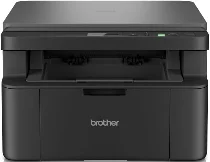
Brother DCP-L1642W Driver lets the computer communicate correctly with this monochrome laser multifunction printer. The machine handles printing, scanning, and copying, so setup should register each available function. After the computer detects the device, print and scan commands can move through the selected connection. Proper driver communication keeps page output, document capture, and printer status reporting consistent.
Brother DCP-L1642W Drivers for Windows
b13cf257b354b037f96c7761c5089566df757993e565be0eb8c48054db2aec18469eac6f0d73d86e694e2b9d1dbcf73b6030a82d0fd41faf7c9cbc3bb7a9c1df469eac6f0d73d86e694e2b9d1dbcf73b6030a82d0fd41faf7c9cbc3bb7a9c1df0917273bb5bc10ee4775f36bd98bd05152835bf5370614cf5a803ffa9260b0adBrother DCP-L1642W Drivers for macOS
45384ef6a3a625c9c0c094dd5bd1e775ce171e97b3043dc3b03b5c8abc7f5a54Brother DCP-L1642W Drivers for Linux
40f0843f6deecf6bedfc6999365cb58b1e68a3dc4895454176103bd2f2821040a83862d5297a3f4bc747d92970a2fc7342e30982d1ffe06251da8dc9cfee0b5d9c3a200db3dc7b2b3332dff8c5226b4f3ee560d20b2e1f4918b1faf7124517b2197f63a52e89b8744f5a3c2d843abb3b76d003d5d4830bdfe675c44841a6c72bcda25534ea8e3018e7d46b970cb08b36084355adedc933aba0c8c7d03e903db901dc859f1978e645147ced5ec4b5448cc3e26b1c6d2f1104834f5891c0e17469d724746540a51f8286f2a318b47657227f7131d384a1a4f0475dacb7e3580f3ee74ef3a5529ebf3b26d6139ce15d75374a4538ba2efd48c28b209b0d705e5ec72ba3bffcf199fee6387cb79d6923214648db0f2df1c5a13f8f8f0a6fe0995c401404f2622e60470b4de25d0cdb4adc0f130ace6b380cc0d4b3d7714ad761c1ae82aa17ba2e331de1fcb34f0a839d27b9b193ac680d9742250a89e588a6bd56206c4e17c6dbcf263d9d08fb460ccd5b9f1a23fce79b30d0a41d96a224839322b2Brother DCP-L1642W Specifications
The Brother DCP-L1642W is a monochrome laser multifunction printer with print, scan, and copy functions. Printing comes from an electrophotographic laser engine, while the controller carries 128 MB of memory. A two-line LCD shows 16 characters per line for local menu and status work. Because no automatic document feeder is assigned to this version, originals for scanning and copying are placed on the flatbed glass.
Print resolution reaches up to 2400 x 600 dpi with HQ1200 technology. Single-sided output runs at up to 20 pages per minute on A4 paper and up to 21 pages per minute on Letter. From ready mode and the standard tray, the first page comes out in less than 10 seconds at 23 °C, while automatic duplex printing is not listed for this model.
Scanning works in colour from the scanner glass, with optical resolution up to 600 x 1200 dpi. Interpolated resolution can reach 19200 x 19200 dpi through supported software. The glass accepts originals up to 215.9 x 300 mm, while scan width reaches 210 mm. Copying reaches 600 x 600 dpi, supports sort copy, and stacks up to 99 pages. From ready mode, first copy out time is less than 16 seconds.
Paper input comes through a 150-sheet standard tray for 80 g/m² plain paper. The tray accepts plain or recycled paper in A4, Letter, Legal, Folio, A5, A5 long-edge, B5, Executive, and 16K sizes. Output capacity is 50 sheets face down, while connectivity covers Hi-Speed USB 2.0, 10Base-T/100Base-TX Ethernet, Wi-Fi, and Wi-Fi Direct. Physical measurements are 385 x 340 x 255 mm. Weight with supplies is 7.3 kg.
Technical Details
| Title | Brother DCP-L1642W Drivers |
|---|---|
| Device Type | All-in-one printer |
| Driver Version | Varies by driver and operating system |
| Available Downloads | Drivers |
| License | Free |
| Manufacturer | Brother Industries, Ltd. |