
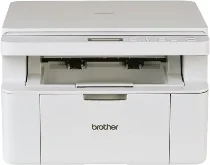
Brother DCP-L1628 Driver helps the computer recognize this monochrome laser multifunction printer and send print or scan commands correctly. The software supports USB communication before the machine appears properly in desktop printer and scanner tools. Copying still works from the printer’s own control panel, while the driver mainly affects computer-based printing and scanning. Once the connection is set correctly, documents and scans move with fewer recognition or communication errors.
Brother DCP-L1628 Drivers for Windows
965fc225fb76c06a506c159b33d959a36a4d7a5b0883a695199c67ba55598eb1469eac6f0d73d86e694e2b9d1dbcf73b6030a82d0fd41faf7c9cbc3bb7a9c1df469eac6f0d73d86e694e2b9d1dbcf73b6030a82d0fd41faf7c9cbc3bb7a9c1df71169ef33cab91b5dc1e848ff483c40ad2eec7be44e69fcb0c084a590a79b49eBrother DCP-L1628 Drivers for Linux
40f49ad7f536cd49e38b40b06b1c97a37fa8b1ad8d455a663e17e50d4533353935d60681fceb79942e2fe4ffb834885d775321300129f252120e701fa5faee2d9c3a200db3dc7b2b3332dff8c5226b4f3ee560d20b2e1f4918b1faf7124517b2197f63a52e89b8744f5a3c2d843abb3b76d003d5d4830bdfe675c44841a6c72bcda25534ea8e3018e7d46b970cb08b36084355adedc933aba0c8c7d03e903db901dc859f1978e645147ced5ec4b5448cc3e26b1c6d2f1104834f5891c0e17469d724746540a51f8286f2a318b47657227f7131d384a1a4f0475dacb7e3580f3ee74ef3a5529ebf3b26d6139ce15d75374a4538ba2efd48c28b209b0d705e5ec72ba3bffcf199fee6387cb79d6923214648db0f2df1c5a13f8f8f0a6fe0995c401404f2622e60470b4de25d0cdb4adc0f130ace6b380cc0d4b3d7714ad761c1ae82aa17ba2e331de1fcb34f0a839d27b9b193ac680d9742250a89e588a6bd56206c4e17c6dbcf263d9d08fb460ccd5b9f1a23fce79b30d0a41d96a224839322b2Brother DCP-L1628 Specifications
The Brother DCP-L1628 is a monochrome laser multifunction printer for printing, scanning, and copying. Printing relies on an electrophotographic laser engine with 128 MB of standard memory. Local operation uses a 10-character, two-line LCD with physical keys rather than a touchscreen. Scanning is built around a flatbed glass, while Brother does not list fax hardware or an automatic document feeder for this DCP unit.
Print resolution is 600 x 600 dpi, while Brother’s best print mode reaches 2400 x 600 dpi. A4 pages print at up to 20 pages per minute, and Letter output reaches 21 pages per minute. The first page leaves ready mode in less than 10 seconds. Scanning from the glass records up to 600 x 1200 dpi. Copying reaches 600 x 600 dpi, with sort copy and stack copy up to 99 pages.
Paper input comes through a 150-sheet standard tray for plain or recycled paper from 65 to 105 g/m2. The tray accepts A4, Letter, Legal, Folio, A5, A5 Long Edge, B5 JIS, B5 ISO, Executive, and 16K media sizes. Finished sheets collect in a 50-sheet face-down output tray. Copy width reaches 210 mm, while the scanner glass accepts originals up to 215.9 mm wide and 300 mm long.
Connectivity is limited to USB 2.0 High-Speed through a USB Type-B receptacle. Brother recommends a cable no longer than 2 metres, and third-party USB hubs are not supported. Ethernet, wireless LAN, and Wi-Fi Direct apply to related wireless models, not this exact machine. Physical measurements are 385 mm wide, 340 mm deep, and 255 mm high. With supplies installed, the unit weighs 7.3 kg.
Technical Details
| Title | Brother DCP-L1628 Drivers |
|---|---|
| Device Type | All-in-one printer |
| Driver Version | Varies by driver and operating system |
| Available Downloads | Drivers |
| License | Free |
| Manufacturer | Brother Industries, Ltd. |