
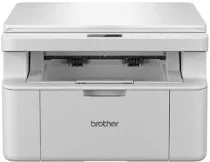
Brother DCP-L1630W Driver helps the computer identify this wireless monochrome laser multifunction printer before print jobs move to the machine. Desktop printing and scanning need stable device communication before the software can reach the printer and flatbed. Copying runs from the printer’s own controls, but correct setup keeps the machine recognized for computer-based tasks. For wireless use, the printer also has to join the same network before pages and scans move with fewer command or connection errors.
Brother DCP-L1630W Drivers for Windows
fb36c922d4ce7cbc5e86302ff82841377ad4fefc78bc2191730537df16770472469eac6f0d73d86e694e2b9d1dbcf73b6030a82d0fd41faf7c9cbc3bb7a9c1df469eac6f0d73d86e694e2b9d1dbcf73b6030a82d0fd41faf7c9cbc3bb7a9c1df71169ef33cab91b5dc1e848ff483c40ad2eec7be44e69fcb0c084a590a79b49eBrother DCP-L1630W Drivers for macOS
45384ef6a3a625c9c0c094dd5bd1e775ce171e97b3043dc3b03b5c8abc7f5a54Brother DCP-L1630W Drivers for Linux
4af784e0fe2e695ff7979457e6080c7a9805bca8bb16b997abe00b7e7bc2d1b52369add5f85f10b25c67cf21a0da5bc89876d8724fee840ee87ef4defa9756249c3a200db3dc7b2b3332dff8c5226b4f3ee560d20b2e1f4918b1faf7124517b2197f63a52e89b8744f5a3c2d843abb3b76d003d5d4830bdfe675c44841a6c72bcda25534ea8e3018e7d46b970cb08b36084355adedc933aba0c8c7d03e903db901dc859f1978e645147ced5ec4b5448cc3e26b1c6d2f1104834f5891c0e17469d724746540a51f8286f2a318b47657227f7131d384a1a4f0475dacb7e3580f3ee74ef3a5529ebf3b26d6139ce15d75374a4538ba2efd48c28b209b0d705e5ec72ba3bffcf199fee6387cb79d6923214648db0f2df1c5a13f8f8f0a6fe0995c401404f2622e60470b4de25d0cdb4adc0f130ace6b380cc0d4b3d7714ad761c1ae82aa17ba2e331de1fcb34f0a839d27b9b193ac680d9742250a89e588a6bd56206c4e17c6dbcf263d9d08fb460ccd5b9f1a23fce79b30d0a41d96a224839322b2Brother DCP-L1630W Specifications
The Brother DCP-L1630W is a monochrome laser multifunction printer for printing, scanning, and copying. Printing relies on electrophotographic laser technology with 128 MB of standard memory. Local controls use a 16-character, two-line LCD with physical buttons rather than a touchscreen. Scanning is built around a flatbed glass. The specification does not list fax hardware or an automatic document feeder for this DCP unit, so originals go on the glass one at a time.
Print resolution reaches 2400 x 600 dpi with HQ1200 technology. A4 pages print at up to 20 pages per minute, while Letter output reaches 21 pages per minute. The first page leaves ready mode in less than 10 seconds. From the glass, scanning reaches 600 x 1200 dpi optically and 19200 x 19200 dpi interpolated. Copying reaches 600 x 600 dpi, with sort copy and stack copy up to 99 pages.
Paper input comes through a 150-sheet standard tray for plain or recycled paper from 65 to 105 g/m2. Supported tray sizes include A4, Letter, Legal, Folio, A5, long-edge A5, B5 JIS, B5 ISO, Executive, and 16K. Finished sheets collect in a 50-sheet face-down output tray. The scanner glass accepts originals up to 215.9 mm wide and 300 mm long, matching A4 and Letter originals.
Connectivity covers USB 2.0 High-Speed, 10Base-T/100Base-TX Ethernet, wireless LAN, and Wi-Fi Direct. Outside Turkey, wireless operation spans IEEE 802.11a/b/g/n infrastructure mode and IEEE 802.11a/g/n Wi-Fi Direct. Physical measurements are 385 mm wide, 340 mm deep, and 255 mm high. With supplies installed, the unit weighs 7.3 kg. Power use is about 380 W while printing or copying, 40 W ready, and 1.0 W in deep sleep.
Technical Details
| Title | Brother DCP-L1630W Drivers |
|---|---|
| Device Type | All-in-one printer |
| Driver Version | Varies by driver and operating system |
| Available Downloads | Drivers |
| License | Free |
| Manufacturer | Brother Industries, Ltd. |