
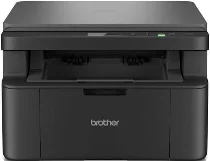
Brother DCP-L1640W Driver helps the computer identify this wireless monochrome laser multifunction printer before print jobs move to the machine. Desktop printing and scanning need proper device communication before the software can reach the printer and flatbed. Copying runs from the printer’s own controls, but correct setup keeps the machine recognized for computer-based tasks. For wireless use, the printer also has to join the correct network before pages and scans move with fewer command or connection errors.
Brother DCP-L1640W Drivers for Windows
fb36c922d4ce7cbc5e86302ff82841377ad4fefc78bc2191730537df16770472469eac6f0d73d86e694e2b9d1dbcf73b6030a82d0fd41faf7c9cbc3bb7a9c1df469eac6f0d73d86e694e2b9d1dbcf73b6030a82d0fd41faf7c9cbc3bb7a9c1df71169ef33cab91b5dc1e848ff483c40ad2eec7be44e69fcb0c084a590a79b49eBrother DCP-L1640W Drivers for macOS
45384ef6a3a625c9c0c094dd5bd1e775ce171e97b3043dc3b03b5c8abc7f5a54Brother DCP-L1640W Drivers for Linux
6e75f9b84ffcb0891b31e1c4c4d34205098e82c965f16367643b55f5e0c7b6f5f16440fce9eb2a4790f99ee934eed5ea0bc1fd32ccbe562e754e83e34928f57b9c3a200db3dc7b2b3332dff8c5226b4f3ee560d20b2e1f4918b1faf7124517b2197f63a52e89b8744f5a3c2d843abb3b76d003d5d4830bdfe675c44841a6c72bcda25534ea8e3018e7d46b970cb08b36084355adedc933aba0c8c7d03e903db901dc859f1978e645147ced5ec4b5448cc3e26b1c6d2f1104834f5891c0e17469d724746540a51f8286f2a318b47657227f7131d384a1a4f0475dacb7e3580f3ee74ef3a5529ebf3b26d6139ce15d75374a4538ba2efd48c28b209b0d705e5ec72ba3bffcf199fee6387cb79d6923214648db0f2df1c5a13f8f8f0a6fe0995c401404f2622e60470b4de25d0cdb4adc0f130ace6b380cc0d4b3d7714ad761c1ae82aa17ba2e331de1fcb34f0a839d27b9b193ac680d9742250a89e588a6bd56206c4e17c6dbcf263d9d08fb460ccd5b9f1a23fce79b30d0a41d96a224839322b2Brother DCP-L1640W Specifications
The Brother DCP-L1640W is a compact 3-in-1 monochrome laser multifunction printer for printing, scanning, and copying. Its electrophotographic laser engine runs with 128 MB of memory. Local operation uses a two-line LCD and physical keys instead of a touchscreen. Scanning relies on the flatbed only, so each original has to go on the glass separately. This DCP model does not carry fax hardware or an automatic document feeder.
Print output reaches up to 2400 x 600 dpi. On A4 paper, mono printing runs at up to 20 pages per minute. From ready mode, the first print leaves in up to 10 seconds. For two-sided output, the user has to turn the sheets manually because automatic duplexing is not fitted. The CIS scanner records up to 600 x 1200 dpi from the glass. Copying reaches 600 x 600 dpi, with stack copy available for up to 99 pages.
Paper feeds from a 150-sheet standard tray for plain or recycled stock between 65 and 105 g/m2. Brother lists A4, Letter, Legal, Folio, A5, long-edge A5, B5, Executive, and 16K for that tray. Finished pages collect in a 50-sheet A4 output area. The scanner glass takes originals up to A4 or Letter size. Brother’s specification sheet does not list a manual feed slot for envelopes or labels on this model.
A nearby computer can connect through Hi-Speed USB 2.0. Network setup can also use Fast Ethernet, wireless LAN, or Wi-Fi Direct. Wireless operation works on 2.4 GHz IEEE 802.11 b/g/n and 5 GHz IEEE 802.11 a/n networks, with WPS setup listed as well. Mobile printing runs through Brother Mobile Connect, AirPrint, Mopria, and Brother Print Service Plugin. Without the carton, the body measures 385 x 340 x 255 mm. The machine weighs 7.40 kg, and deep sleep power use is about 1.0 W.
Technical Details
| Title | Brother DCP-L1640W Drivers |
|---|---|
| Device Type | All-in-one printer |
| Driver Version | Varies by driver and operating system |
| Available Downloads | Drivers |
| License | Free |
| Manufacturer | Brother Industries, Ltd. |