
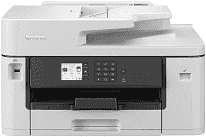
The Brother MFC-J2340DW Driver links the multifunction inkjet printer with a computer for printing, scanning, and faxing. A nearby computer can use USB, while shared setups can run over wired Ethernet or the wireless network. Once the connection is established, the computer can send print data and detect the scanner from compatible software. Copying does not depend on the computer because those controls remain on the printer itself.
Brother MFC-J2340DW Drivers for Windows
1a49ac52b7a570e189cea33672d1ef66b3740a177477fb883a4d8b00bdb16a9b76ddc3d3ac00c5aeb5f775581dd2d992d55d4406acb173225462f73ae3dcbd7976ddc3d3ac00c5aeb5f775581dd2d992d55d4406acb173225462f73ae3dcbd790edce9170c3f46f065e52aa6335c093befa453212698a94c7d59fcfc5197fa7ec3db3f10657ece97a5dbae2b5490dd24b3691426d6add2c17e1cc1c2fc8b609d71169ef33cab91b5dc1e848ff483c40ad2eec7be44e69fcb0c084a590a79b49eBrother MFC-J2340DW Drivers for macOS
5d09788e98b2c9e91b297e4245f410a6e990743dddec3a740d0cf6a3735ae782Brother MFC-J2340DW Drivers for Linux
9ba8b190a53b4ad93a32f7424fc2bc76b8614c8ee46b0d29e10d0a6a24f9f3ec5e609641953b0f38a76cc9de1089ae857d0559507ef575100ed89536fe2bcdab9c3a200db3dc7b2b3332dff8c5226b4f3ee560d20b2e1f4918b1faf7124517b2197f63a52e89b8744f5a3c2d843abb3b76d003d5d4830bdfe675c44841a6c72bcda25534ea8e3018e7d46b970cb08b36084355adedc933aba0c8c7d03e903db901dc859f1978e645147ced5ec4b5448cc3e26b1c6d2f1104834f5891c0e17469d724746540a51f8286f2a318b47657227f7131d384a1a4f0475dacb7e3580f3ee74ef3a5529ebf3b26d6139ce15d75374a4538ba2efd48c28b209b0d705e5ec72ba3bffcf199fee6387cb79d6923214648db0f2df1c5a13f8f8f0a6fe0995c401404f2622e60470b4de25d0cdb4adc0f130ace6b380cc0d4b3d7714ad761c1aee28a8765f6637456d81ad1a56226e6857be2f1581fdcd9e4a5a4fbc4c42dd3450a4412b306b9ce2eb7e3ef4734a7b648f9561f525922b02541e98b545929dc2b82aa17ba2e331de1fcb34f0a839d27b9b193ac680d9742250a89e588a6bd56206c4e17c6dbcf263d9d08fb460ccd5b9f1a23fce79b30d0a41d96a224839322b2Brother MFC-J2340DW Specifications
The Brother MFC-J2340DW prints, scans, copies, and faxes in colour, with paper support extending to A3. Its piezo printhead uses 420 nozzles for black and the same number for each colour channel. Local settings appear on a 2.7-inch colour touchscreen. The machine also carries 256 MB of memory for processing print and document tasks.
Both black and colour printing reach up to 28 ipm. The first black page takes about 4.4 seconds, with colour following at roughly 4.6 seconds. Maximum print resolution is 1200 × 4800 dpi. Automatic duplex output stops at A4, even though single-sided and borderless jobs can extend to A3 or Ledger. Scanning from the glass reaches 1200 × 2400 dpi.
The main cassette holds 250 sheets. Specialty paper and envelopes enter one sheet at a time through the manual feed slot. A3 and Ledger paper fit, but glossy stock is restricted to A4 or Letter. The output tray holds 100 A4 sheets and drops to 50 sheets for larger pages. Multi-page originals can pass through the 50-sheet automatic document feeder, which accepts documents up to 355.6 mm long.
USB suits one nearby computer, and Ethernet provides a wired network connection. Wireless jobs can travel over Wi-Fi or connect directly through Wi-Fi Direct. AirPrint and Mopria are available for compatible phones and tablets. With the trays closed, the body measures 530 × 398 × 305 mm and weighs 17 kg. Ready mode uses about 5.5 W. Fax transmission runs through a 14.4 Kbps modem, while the address book stores 100 names with two numbers or email addresses for each entry.
Technical Details
| Title | Brother MFC-J2340DW Drivers |
|---|---|
| Device Type | All-in-one printer |
| Driver Version | Varies by driver and operating system |
| Available Downloads | Drivers |
| License | Free |
| Manufacturer | Brother Industries, Ltd. |