
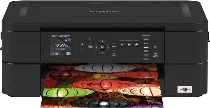
Brother DCP-J572DW Driver helps the computer identify this wireless inkjet multifunction printer before print jobs move to the machine. Desktop printing and scanning need proper device communication before the software can reach the printer and flatbed. Copying runs from the printer’s own controls, but correct setup keeps the machine recognized for computer-based tasks. For wireless use, the printer also has to join the same network before documents and scans move with fewer command or connection errors.
Brother DCP-J572DW Drivers for Windows
9c2f6db4bc990efba4a1df16ffa4c9a7485230b5eba8e7e99aeda029abdbfdf845b5c6d864e24a902b113181b4af15dc996e92171d5b1a62535cf7d44c0e87b745b5c6d864e24a902b113181b4af15dc996e92171d5b1a62535cf7d44c0e87b70edce9170c3f46f065e52aa6335c093befa453212698a94c7d59fcfc5197fa7e099227078b82574220d63ba37643754caabc477bdfbded9027bd95b0dd18e02aBrother DCP-J572DW Drivers for Linux
7166e4c46e42c24dc9342eccf014547dda61580c91be4293e821a196343a8fa76227e567787431eca35b6cf5f8c7ac9fe208a508fdb1e6b945e71d4d7f73ef7e027b73648722ac8c8eb1a9c419d284a6562cc763feac9740a2b75a683b09297289d82315fd9d629f8af7b5bc489f392da218acfe2436e42eec147246101636d5cda25534ea8e3018e7d46b970cb08b36084355adedc933aba0c8c7d03e903db901dc859f1978e645147ced5ec4b5448cc3e26b1c6d2f1104834f5891c0e174694225e91dd7f7d0ba2a202f616b15b669be7800c271a7d25efed94191f71fc4500fec3bcffeb597b2d23ef7ff31f34dc7bd8d4736a35c2d1ff5e56784d709ce532ba3bffcf199fee6387cb79d6923214648db0f2df1c5a13f8f8f0a6fe0995c401404f2622e60470b4de25d0cdb4adc0f130ace6b380cc0d4b3d7714ad761c1ae82aa17ba2e331de1fcb34f0a839d27b9b193ac680d9742250a89e588a6bd56206c4e17c6dbcf263d9d08fb460ccd5b9f1a23fce79b30d0a41d96a224839322b2Brother DCP-J572DW Specifications
The Brother DCP-J572DW is a color inkjet multifunction printer for printing, scanning, and copying. Its piezo print head uses 210 mono nozzles and 70 nozzles for each color channel. The machine carries 128 MB of memory, and the control panel uses a 1.8-inch color TFT LCD. A 20-page automatic document feeder sits above the flatbed scanner for multipage originals. Fax functions belong to Brother MFC models, not this DCP unit.
Print resolution reaches up to 1200 x 6000 dpi on Windows. ISO speed runs at 12 ipm in mono and 6 ipm in color. In fast mode, output rises to 27 ppm mono and 10 ppm color. Automatic duplex printing works with plain or recycled A4, Letter, Executive, and A5 paper. From the glass, the scanner records up to 1200 x 2400 dpi optically. Brother’s scan utility can interpolate that figure to 19200 x 19200 dpi, while the ADF scans at up to 1200 x 600 dpi.
Paper feeds mainly from a 100-sheet tray. That tray takes A4, Letter, Executive, A5, A6, envelopes, photo paper, and index cards. A separate photo tray holds 20 sheets in 10 x 15 cm or 9 x 13 cm sizes. For single sheets, the manual feed slot handles envelopes and glossy media. Finished pages collect in a 50-sheet output tray. Borderless printing works on A4, Letter, A6, photo, Photo L, Photo 2L, and index card sizes.
A nearby computer can connect through Hi-Speed USB 2.0. Wireless printing runs through wireless LAN or Wi-Fi Direct. Brother does not list wired Ethernet or NFC for this DCP unit. Over a network connection, the machine can handle printing, scanning, and photo access. PhotoCapture Center reads SD, SDHC, SDXC, and MultiMediaCard formats. The unit weighs 7.2 kg. Power use is about 16 W during copying, 3 W in ready mode, 0.7 W in sleep, and 0.2 W when off.
Technical Details
| Title | Brother DCP-J572DW Drivers |
|---|---|
| Device Type | All-in-one printer |
| Driver Version | Varies by driver and operating system |
| Available Downloads | Drivers |
| License | Free |
| Manufacturer | Brother Industries, Ltd. |