
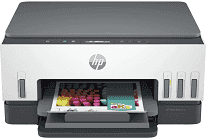
HP Smart Tank 6005 Driver helps Windows or macOS recognize the all-in-one printer during setup. After installation, print jobs can reach the ink-tank printer instead of stopping at device detection. The same software link lets the flatbed scanner send originals back to the computer, and copying remains handled from the printer itself. A clean driver setup is especially important when the computer does not identify the printer correctly over its selected connection.
HP Smart Tank 6005 Drivers for Windows
5e55e7ff296870ede3f52edeae10ddd3b5eb43747d613285d5bbb8dc12e70ca6620068045902345004931235f980d18321eb73b2b9e83672a905b17b6e823677b43e074dd8d4aa3f8bfd43bcf90e6fe132b6dacd28543d9c29bf70cc6d06c67733a48d17157441a5f626bf8b2b5f85c04c1a524bacff1c548f899ad90978765ec11fe40d2b794ffeb0c9f87b6f22efe7b178646c583b58276f0dc4b24872778a49aee77d43d920b362885f4bdc240b68dca11ed11c603fd326dea9ecef33110b4e19a78f0f7887e81a3c71b6bafd43b4a6cc10bf39228f932118cff6b9a06b7983d239d64aa753b224ac1a5c229527fba7a264eb3653fb95af54a387b27b3b1b83d239d64aa753b224ac1a5c229527fba7a264eb3653fb95af54a387b27b3b1bHP Smart Tank 6005 Specifications
HP Smart Tank 6005 is a wireless all-in-one ink-tank printer with print, scan, and copy hardware in the same body. Printing comes from an HP Thermal Inkjet engine fed by refillable black, cyan, magenta, and yellow ink bottles. Separate black and tri-color printheads handle the ink delivery. The control panel carries a two-line LCD with smart guided buttons, so basic setup and status checks do not rely on a large touchscreen. Scanning uses a flatbed CIS unit, and each original goes directly on the glass because no automatic feeder is fitted.
Black print quality reaches up to 1200 x 1200 rendered dpi. Color output can reach up to 4800 x 1200 optimized dpi when the job comes from a computer. ISO speed is rated at 12 ppm in black and 7 ppm in color, which fits everyday documents better than long unattended runs. Draft printing on A4 moves faster, at up to 22 ppm black and 21 ppm color. Automatic duplex printing is built in for two-sided pages. First-page output is listed as fast as 15 seconds in black and 18 seconds in color.
The flatbed scans at up to 1200 dpi optically, with hardware resolution listed at 1200 x 1200 dpi. Its maximum scan area is 216 x 297 mm, enough for a full A4 sheet. Copying runs at up to 11 cpm in black and 5 cpm in color. The copier can produce as many as 99 copies from one original, which helps when repeating short documents. Resize settings run from 25% to 400%, and copy resolution reaches up to 600 dpi for black text and color graphics.
Paper feeds from a 150-sheet input tray, and printed pages collect in a 100-sheet output tray. Standard sheets include A4, A5, A6, and B5. The same feed also takes envelopes and postcards, so small paper jobs do not need a separate tray. Borderless printing reaches up to 210 x 297 mm on supported media. Wireless jobs can use dual-band Wi-Fi or Wi-Fi Direct. A wired setup uses Hi-Speed USB 2.0 device ports. With the trays closed, the printer measures 427.5 x 364.0 x 198.6 mm and weighs 6.38 kg.
Technical Details
| Title | HP Smart Tank 6005 Drivers |
|---|---|
| Device Type | All-in-one printer |
| Driver Version | Varies by driver and operating system |
| Available Downloads | Drivers |
| License | Free |
| Manufacturer | HP Inc. |