
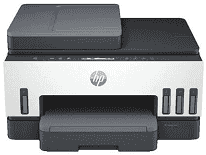
HP Smart Tank 6000 Driver lets the computer identify the all-in-one printer and send the correct instructions during setup. Print jobs can travel through a USB connection or the wireless network. Scanning and copying also depend on the installed software matching the printer correctly. Once that link is active, each job follows the settings chosen on the computer.
HP Smart Tank 6000 Drivers for Windows
5e55e7ff296870ede3f52edeae10ddd3b5eb43747d613285d5bbb8dc12e70ca6620068045902345004931235f980d18321eb73b2b9e83672a905b17b6e823677b43e074dd8d4aa3f8bfd43bcf90e6fe132b6dacd28543d9c29bf70cc6d06c67733a48d17157441a5f626bf8b2b5f85c04c1a524bacff1c548f899ad90978765ec11fe40d2b794ffeb0c9f87b6f22efe7b178646c583b58276f0dc4b24872778a49aee77d43d920b362885f4bdc240b68dca11ed11c603fd326dea9ecef33110b4e19a78f0f7887e81a3c71b6bafd43b4a6cc10bf39228f932118cff6b9a06b7983d239d64aa753b224ac1a5c229527fba7a264eb3653fb95af54a387b27b3b1b83d239d64aa753b224ac1a5c229527fba7a264eb3653fb95af54a387b27b3b1bHP Smart Tank 6000 Specifications
HP Smart Tank 6000 is a colour all-in-one inkjet that prints, scans, and copies. It has no fax hardware or automatic document feeder. Printing comes from an HP Thermal Inkjet printhead supplied by four refillable tanks for black, cyan, magenta, and yellow ink. A CIS flatbed sits above the print engine, so every original must be placed on the glass by hand. The control panel carries guided buttons and a small icon display rather than a touchscreen.
Black documents run at up to 12 ISO ppm, with colour pages reaching 7 ISO ppm. Black resolution tops out at 1200 x 1200 rendered dpi. Colour output from a computer can reach 4800 x 1200 optimized dpi. Scanning relies on the flatbed at up to 1200 dpi optical resolution. Copies use 600 x 600 dpi output and can be resized from 25% to 400%. One copy job can produce as many as 99 sheets.
Paper loads into a 150-sheet input tray, and the output area holds up to 100 printed sheets. Automatic duplexing turns plain-paper pages inside the machine for two-sided documents. Borderless output reaches Letter or A4, with smaller photo sizes also listed. Photo paper and brochure sheets use the same main feed. Cards, labels, and envelopes go there as well rather than through a separate manual slot.
A nearby computer can connect through Hi-Speed USB 2.0. Wireless jobs can travel through a dual-band Wi-Fi network or directly by Wi-Fi Direct when no router connection is available. Phones and tablets can print through the HP app, Apple AirPrint, Mopria, or the HP Print Service Plugin. Ethernet and memory-card hardware are not fitted. With the trays closed, the body measures about 427.5 x 364 x 198.6 mm and weighs roughly 6.38 kg. Sleep mode draws about 2 watts.
Technical Details
| Title | HP Smart Tank 6000 Drivers |
|---|---|
| Device Type | All-in-one printer |
| Driver Version | Varies by driver and operating system |
| Available Downloads | Drivers |
| License | Free |
| Manufacturer | HP Inc. |