
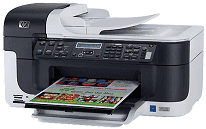
If you are looking for a printer or scanning device, then HP Officejet J6415 is an ideal choice for you. From this printer, you can efficiently perform functions such as scanning and printing with a single device. It is very compact, and you can quickly place this printer in a small space. This printer supports various types of memory cards such as SD, MMC, SDHC and Memory stick, Duo or Pro, etc.
HP Officejet J6415 driver is also compatible with the latest versions of both Microsoft Windows and Macintosh operating systems, including Windows 10 or Mac OS X 10.13 or higher.
HP Officejet J6415 Drivers for Windows
cadbad4b9569412727ad164646cc63246ef07d914bfbacbc7741e08192a6892d9bc378b2bbfbc718eb434fe5900e26ae4acc0c97059baa7942e9bdeebbcf0d6f7fb609f0ea28fc62c17fb0868d6864014d7621a5ecb1fc5b02a5835c73ed7e3f0d01ad39afe7dc2ce7a341beee8a3563b44975039dae68eecef6306a836078b863e2050a6973ce2ccaf9c93f8e150291baf339f401f64d04b3fe534262cd8ada1ccf153f1db5ef4c881f95459b5f29af163183921f1a0841e7ee5a950aea20d904d4d22637afb858f24b135a94e3f8c9c11c33194bb7d8e2f266989daaf7536eHP Officejet J6415 Drivers for macOS
50702cffd8c77ef78beb9aef24d959abb3269a00093e241a2ec879c45e8c5578ac7ff2509dfcb6e0cb66bb16871dcbef1eda0e3121202bb6e200b6bd0bb440e40684365e5bd9a3fdcb9cd795621a2072183a14f5946fdb87518d952eab792a5eHP Officejet J6415 HP Printer Officejet J6415 cartridges
HP 74 Black Original Ink Cartridge (~200 pages ), HP 75 Tri-color Original Ink Cartridge (~170 pages ), HP 100 Gray Photo Original Ink Cartridge (~80 pages )
Compatible operating system for HP Officejet J6415 driver:
1. Operating system- Windows 2000, XP, x64, Vista, Mac OS X 10.3.9 or Mac OS X 10.4.6
2. Processor: Intel Pentium 2, Intel Pentium 4, 800 MHz, and 400 MHz
3. RAM: 128 MB, 512 MB, and 256 MB
Print: The resolution of this printer is up to 1200 dots per inch for black and 1200×1200 dots per inch for photo paper. The speed of this printer is 31 pages per minute for black and 25 pages per minute for color print.
Paper tray: In this printer, the paper capacity of input tray is up to 250 sheets of plain paper and up to 150 sheets of plain paper in the output tray.
Scan: The scanning resolution of the printer is up to 2400×4800 pager per inch and up to 19200 dots per inch for enhanced (software).
Paper type: It supports the various types of paper such as Envelopes, Cards, Plain paper, Photo paper, etc.
Features of HP Officejet J6415:
1. In this printer, an image editor is also included.
2. This printer can easily convert the scanned text to editable text with OCR software.
3. It consumes very little power.
Technical Details
| Title | HP Officejet J6415 Drivers |
|---|---|
| Device Type | All-in-one printer |
| Driver Version | Varies by driver and operating system |
| Available Downloads | Drivers |
| License | Free |
| Manufacturer | HP Inc. |