
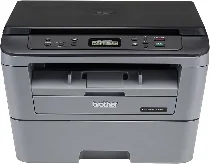
Brother DCP-L2520D Driver helps the computer identify this monochrome laser multifunction printer correctly. The driver links the computer with the print, scan, and copy functions without adding fax support. This model uses a USB connection, so the correct driver keeps print jobs and scan commands matched to the machine. After setup, documents can move properly between the computer and printer.
Brother DCP-L2520D Drivers for Windows
3b608efb61ec100f8d428c1013dd99235c79d112d0414c5e3cc022e11e6d9fe5b52f25587ca69fce927262d7b33c266ee2d74004ac420ff6b2abb100f3a361b69284b5adddb0a45295f9f8885622930f13578bfbf7220b2cee3a3464fd5d8dd29284b5adddb0a45295f9f8885622930f13578bfbf7220b2cee3a3464fd5d8dd247ca7a0f6f63ee5e6158ae7cb3b965e445c042d5d1680eeb1cc3a10378890985Brother DCP-L2520D Drivers for macOS
ccd05a0ff77b516148780b0faac3e495cc38a6893f850a417f0d8275770fb253ac24dc9ef5043009b2f2646e04861883d81baeb6d1d13139b1686028b80f59c0Brother DCP-L2520D Drivers for Linux
027b73648722ac8c8eb1a9c419d284a6562cc763feac9740a2b75a683b09297289d82315fd9d629f8af7b5bc489f392da218acfe2436e42eec147246101636d5cda25534ea8e3018e7d46b970cb08b36084355adedc933aba0c8c7d03e903db901dc859f1978e645147ced5ec4b5448cc3e26b1c6d2f1104834f5891c0e174694225e91dd7f7d0ba2a202f616b15b669be7800c271a7d25efed94191f71fc4500fec3bcffeb597b2d23ef7ff31f34dc7bd8d4736a35c2d1ff5e56784d709ce532ba3bffcf199fee6387cb79d6923214648db0f2df1c5a13f8f8f0a6fe0995c401404f2622e60470b4de25d0cdb4adc0f130ace6b380cc0d4b3d7714ad761c1aed9e8a164b36bd1bc74cb7a90111ae1f0d2569a1d3a221db69b2064acb850a24d2e01bfadc82b0416f05c18ba1d3d23999672bb8db48832815a3afd2cb395bb7d397cb2d91e0748f4c0498d831647efbc62af9e02f576ad52dc520bcac876f79518823eb345e4e4391d7a6a3a1d442a96b2224e12a0600542f0d3d700cf15870682aa17ba2e331de1fcb34f0a839d27b9b193ac680d9742250a89e588a6bd56206c4e17c6dbcf263d9d08fb460ccd5b9f1a23fce79b30d0a41d96a224839322b2Brother DCP-L2520D Specifications
The Brother DCP-L2520D is a monochrome laser multifunction printer for printing, scanning, and copying. Its electrophotographic laser system works with 32 MB of memory. On the control panel, a 16-character, two-line LCD sits beside physical keys for copy and scan tasks. The scanner is a CIS flatbed, so originals go directly on the glass. Brother does not list fax hardware or an automatic document feeder for this USB-only model.
Print resolution is 600 x 600 dpi, with HQ1200 output equivalent to 2400 x 600 dpi quality. A4 pages print at up to 30 pages per minute, and the first page leaves ready mode in less than 8.5 seconds. For two-sided pages, the built-in duplex unit works with supported plain-paper sizes. The flatbed scanner records up to 600 x 2400 dpi optical resolution. Copy scaling runs from 25% to 400%, with up to 99 copies.
Paper feeds from a 250-sheet cassette for plain, thin, thick, recycled, bond, or label media. The cassette takes A4, Letter, A5, A5 Long Edge, A6, and Executive paper sizes. Separate sheets use the manual feed slot, including envelopes and thicker media. Printed pages stack in a 100-sheet face-down tray. Heavier sheets or envelopes can leave through the one-sheet face-up path.
A computer connects through Hi-Speed USB 2.0, since this version has no wired Ethernet or wireless network interface. The body is 409 mm wide, 398.5 mm deep, and 267 mm high. With supplies installed, the printer weighs 9.7 kg. During printing, power use is about 510 W. Ready mode uses 60 W, sleep mode uses 6.6 W, and power-off mode uses 0.08 W. Brother lists the monthly duty cycle at up to 10,000 pages.
Technical Details
| Title | Brother DCP-L2520D Drivers |
|---|---|
| Device Type | All-in-one printer |
| Driver Version | Varies by driver and operating system |
| Available Downloads | Drivers |
| License | Free |
| Manufacturer | Brother Industries, Ltd. |