
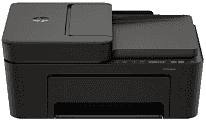
HP DeskJet 4310 Driver helps the computer recognize this all-in-one printer for print, scan, and copy work. After installation, the printer can receive jobs from the computer instead of relying only on basic system detection. The scanner also needs the software link so scan commands and device status appear correctly. A matching driver keeps USB or wireless communication steady during everyday document work.
HP DeskJet 4310 Drivers for Windows
c8d2aa2725a82146f4cf0e31ad201cf8573cc64ed67fa905935e13958a525acb620068045902345004931235f980d18321eb73b2b9e83672a905b17b6e82367733a48d17157441a5f626bf8b2b5f85c04c1a524bacff1c548f899ad90978765ec11fe40d2b794ffeb0c9f87b6f22efe7b178646c583b58276f0dc4b24872778a83d239d64aa753b224ac1a5c229527fba7a264eb3653fb95af54a387b27b3b1bHP DeskJet 4310 Specifications
HP DeskJet 4310 is a color HP Thermal Inkjet all-in-one, so the same body prints, copies, and scans. Ink comes from two cartridges: black and tri-color. In supported regions, replacements use HP 308 supplies. Scanning uses a Contact Image Sensor flatbed, with a 35-sheet automatic document feeder for small multi-page originals. The control area stays simple: front copy buttons, seven total buttons, five LEDs, and an LCD icon display.
Black pages print at up to 8.5 ppm in ISO A4 testing. Color slows to 5.5 ppm, which fits short home documents better than heavy office runs. Draft mode is faster, reaching 20 ppm in black and 16 ppm in color. Best black output is listed at 1200 x 1200 rendered dpi. For color, the top 4800 x 1200 optimized dpi setting needs a computer, selected HP photo paper, and 1200 input dpi.
The flatbed accepts originals up to 216 x 297 mm. Longer sheets go through the automatic feeder, which takes documents up to 215.9 x 355.6 mm. Optical scan resolution reaches 1200 dpi, and hardware scanning is listed at 1200 x 1200 dpi. From the glass, scans use 24-bit color depth. Copying runs in black or color at up to 300 x 300 dpi, with each copy job limited to nine pages.
Paper loads through a 60-sheet input tray, so the printer suits small batches rather than long unattended printing. Finished pages collect in a 25-sheet output tray. Standard paper sizes include A4, B5, A6, and DL envelopes. Custom sheets can range from 76 x 127 mm to 215 x 355 mm. Two-sided printing needs manual handling, and borderless output is not available. A nearby computer can use Hi-Speed USB 2.0. Wireless printing runs over dual-band 2.4 GHz and 5 GHz Wi-Fi, with no Ethernet port listed.
Technical Details
| Title | HP DeskJet 4310 Drivers |
|---|---|
| Device Type | All-in-one printer |
| Driver Version | Varies by driver and operating system |
| Available Downloads | Drivers |
| License | Free |
| Manufacturer | HP Inc. |