
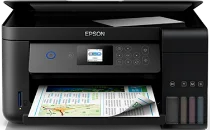
Epson L4160 has the Epson Micro Piezo print head as its priority. It also comprises 180 black nozzles and 59 nozzles for each color, including cyan, yellow, and magenta. Also, its minimum droplet size is about three picoliters (pl) with its variable-sized droplet technology and pigment black and dye color inks. The printing resolution of the Epson L4160 model is 5760 x 1440 dots per inch (dpi). Meanwhile, this Epson L4160 comes with a dedicated print driver for OS compatibility.
Epson L4160 Drivers for Windows
0575cf6e1fd9d254d3d68ad6d8876c20eb56cac7f6c2f094dedfc233a725a5f3979ff6e94d05ef41e3c699468149f28417745413247c5aba7847495631c7d190e8caaab3bd50e9f02de72042235d3fa28bb4fcf5a82b17ee399aee8975420b05Epson L4160 Drivers for macOS
b757a5f8748e7fd543a8097c12b569fedb22efe76afac918dd122d72e1096344bf078d1bd86cac36ebd65e6af519f621b04f265619a328e2f0f99175944468dcEpson L4160 Specifications
As a multifunctioning device, it can also print, copy, and scan. The ISO/IEC 24734 standard mode speed is about 10.5 pages per minute (ppm) for black and white documents when printing. But the color printing in this mode has a rate of 5 ppm. Also, when printing typically, the print rate is 33 ppm for monochrome printing on plain paper. On the flip side, the color printing has a speed of 15 ppm with standard printing.
When using Epson Premium Glossy Photo Paper, each photo’s print rate is 69 seconds. As a scanner, this machine can produce a speed of 2.4 milliseconds per line for an input resolution of 300 dpi. But when the input resolution is 600 dpi, the scanning speed is 7.2 milliseconds per line. Besides, the single-sided scanning on A4 paper in color has a rate of 9.5 milliseconds per line. Also, the optical resolution is up to 1200 x 2400 dpi for both horizontal and vertical sides.
The scanner type is also the contact image sensor (CIS) element. About the supported paper formats for all the functions, the standard paper formats include A4, A5, A6, letter, legal, envelopes, C6, B5, photo paper sizes, and custom sizes. While the standard input tray can hold 100 sheets of plain paper or 20 photo sheets, the output tray can hold 30 printed paper sheets.
Technical Details
| Title | Epson L4160 Drivers |
|---|---|
| Device Type | All-in-one printer |
| Driver Version | Varies by driver and operating system |
| Available Downloads | Drivers |
| License | Free |
| Manufacturer | Seiko Epson Corporation |