
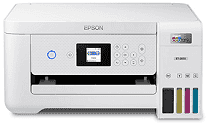
Epson ET-2850 Driver lets the computer send print, scan, and copy instructions to the EcoTank all-in-one correctly. During setup, it matches the printer with compatible Windows or macOS systems and keeps the basic controls available. A nearby computer can use USB, and wireless setup lets supported devices send jobs over the network. With the right driver in place, documents and photos print with the selected paper, quality, and layout settings.
Epson ET-2850 Drivers for Windows
a4ae8402a6552727755fff9a128b25c2796d1bfb728a5ce61767d36c24d8e3611a999660fbc1800c67cf9e3887f300c6c39bee6b9f6d0adba050a446d0436af954aa1f07d9a52563f2d8807a3653533a86d6ee1f71f78055d24c0c146b407de431f39041e99234b22542bc3b6bc4abfa502547471d65181f1cfbdc1fd4d15d02180a81d0e184fc245546e5f7fc39027736594f04299a08ce50977b13f84b64fe6e5d23c64b3340a3885a44e0f76f2f847b6127f921b153afabf0c72b976e8fd6Epson ET-2850 Drivers for macOS
973c108a6fee5e6f3281955f2368330345279c425903959896b67fa64910097272f632d67b40fedc3dab8eb154c87301b4d9fbce8c9ce27207c4dc3cd1436b90e319f2f3d8f73b5acd1f32200a6532432d9747428e5dc7fa222ec628329074dd319026e445ea179b27455527a34f991c0727f85cca0ee32f76c6d5a4406a2a82Epson ET-2850 Specifications
The Epson ET-2850 is an EcoTank color inkjet that prints, scans, and copies without cartridges. Four refillable 502 ink tanks feed the CMYK MicroPiezo printhead, so each color has its own bottle. The control panel uses a 1.44-inch color LCD with physical buttons for walk-up jobs. Scanning stays manual because the CIS flatbed takes one original at a time and no automatic document feeder is fitted.
Print resolution reaches 5760 × 1440 dpi when the selected paper and settings call for fine detail. Black documents print at 10.5 ISO ppm, and color pages run at 5.0 ISO ppm. For two-sided documents, the duplex unit slows to 6.0 ISO ppm in black and 4.0 ISO ppm in color. The flatbed scans at 1200 × 2400 dpi hardware resolution, with interpolation available up to 9600 dpi. Copies can be reduced or enlarged from 25% to 400%.
Paper loads from the rear feed rather than a front cassette. It takes up to 100 plain sheets, 20 photo sheets, or 10 No. 10 envelopes, so larger jobs need refilling. Printed pages collect in a smaller output tray rated for 30 plain sheets. Photo paper and common office sizes use the same feed path. Legal paper fits too, although longer sheets extend from the compact body during use.
A nearby computer can connect through Hi-Speed USB. Wireless jobs use 2.4 GHz Wi-Fi 4, and Wi-Fi Direct helps when no router connection is available. Ethernet is absent, so wired network placement is not an option. Phone and tablet printing can use Apple AirPrint, Mopria Print Service, or Epson mobile apps. With the trays closed, the body measures 14.8 × 13.7 × 7.4 inches; printing depth increases to 22.3 inches.
Technical Details
| Title | Epson ET-2850 Drivers |
|---|---|
| Device Type | All-in-one printer |
| Driver Version | Varies by driver and operating system |
| Available Downloads | Drivers |
| License | Free |
| Manufacturer | Seiko Epson Corporation |