
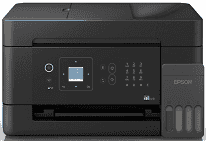
Epson EcoTank L5390 Driver lets the computer exchange commands with the printer for print, scan, copy, and fax tasks. A proper installation also keeps the scanner available to applications that need to import documents. A nearby computer can use USB, or jobs can travel across the wireless network. Once the connection is configured, print files and scanned pages move between the computer and the machine without missing device functions.
Epson EcoTank L5390 Drivers for Windows
43ed3cc5c27e79013b1ef317df40d6a22cbcabaec4b28f98b4ac95461b2d13a6a152d982b76dd8b583374147cc74a255e8febdc46231cdf9df39628123e20f06068f8e5df72f84e2ff6769b2e2bd083db8fdd7123999b41e3c2d65f2afce5cdeEpson EcoTank L5390 Drivers for macOS
85443945da509bc9a38c5fdda2b7eb4395c66b583852b0a4ffa0bddb54e7ae40dbed7d87a6334883986e468c9a5b7589c38515b1b3c50c18e5e103b6327a098dEpson EcoTank L5390 Drivers for Linux
53f67c99e60f414518c456b268611f70f1697a10b741c9981fa55ffd8ba72333Epson EcoTank L5390 Specifications
Epson EcoTank L5390 prints in colour and also scans, copies, and sends faxes. Ink reaches the piezoelectric printhead from four refillable tanks. The head uses 180 nozzles for black and 59 for each colour. A 30-sheet automatic document feeder takes multipage originals, and single sheets can be placed on the CIS flatbed. Local controls sit beside a 1.44-inch colour LCD, which is not touch-sensitive.
Print resolution reaches 5,760 x 1,440 dpi. Epson rates ISO output at up to 11.0 ipm in black and 6.0 ipm in colour. A monochrome first page takes about 10 seconds, compared with roughly 16 seconds for colour. Borderless printing is limited to 4R photos, and one of those prints takes around 90 seconds. The scanner captures at 1,200 x 2,400 dpi, while black copies run at up to 7.7 ipm. Copy size can be adjusted from 25 to 400 percent, with no more than 99 copies in one job.
Paper loads from a single 100-sheet rear tray. When premium glossy photo paper is used, capacity falls to 20 sheets. Printed pages collect in an output area rated for 30 plain sheets or 20 photo sheets, so large jobs need occasional attention. Standard paper ranges from A6 to A4 and also includes Letter, Legal, and Indian Legal. Envelopes and common photo sizes fit the same feed. Custom sheets can reach 215.9 x 1,200 mm, but two-sided printing requires the user to turn the paper manually.
A nearby computer can connect over USB 2.0, and wired networks use 10/100 Ethernet. Wireless jobs can travel through Wi-Fi or directly through Wi-Fi Direct. The direct link accepts up to eight devices without relying on the home router. Phones and tablets can print through Epson Connect, AirPrint, Mopria, or Epson Smart Panel. With its trays closed, the body measures 375 x 317 x 224 mm and weighs 5.5 kg. Power use is about 12 W during operation and drops to 0.5 W in sleep mode.
Technical Details
| Title | Epson EcoTank L5390 Drivers |
|---|---|
| Device Type | All-in-one printer |
| Driver Version | Varies by driver and operating system |
| Available Downloads | Drivers |
| License | Free |
| Manufacturer | Seiko Epson Corporation |