
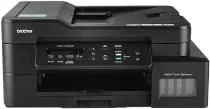
Brother DCP-T725DW Driver lets the computer send print and scan commands to this ink-tank multifunction printer. After installation, the operating system can recognise the machine for printing and scanning. Copying still runs from the printer controls, while the driver keeps related computer communication available. A USB cable can handle a direct connection from a nearby computer. Wireless setup lets supported devices send jobs to the printer in the correct format.
Brother DCP-T725DW Drivers for Windows
20ff7c7b0fc3a8af1ce7d9e076adbcf0dc5f8971ee284832d227712972e357bb8a29d78ea9ce4db7aea7bb16c151f08a8f155b3364ed3c4ccf0da73c0564da938a29d78ea9ce4db7aea7bb16c151f08a8f155b3364ed3c4ccf0da73c0564da930edce9170c3f46f065e52aa6335c093befa453212698a94c7d59fcfc5197fa7e5b2b4c8a8829c0bcb136d12fb3520d01d301033aa6a2611da67d29b70eebdf0971169ef33cab91b5dc1e848ff483c40ad2eec7be44e69fcb0c084a590a79b49eBrother DCP-T725DW Drivers for macOS
f371d46a4d9b6d5de83e6589f8eb6b4302be078173990194ce9beae826d61d42Brother DCP-T725DW Drivers for Linux
7cae911da5bf7a3d6716049a4dbcd6c55823216df66136c96ddd710f7ed913b7c9097b564798a06d00b2f2dc2e8544d569a5c815f01b6c4dbf67de64ae18c7179c3a200db3dc7b2b3332dff8c5226b4f3ee560d20b2e1f4918b1faf7124517b2197f63a52e89b8744f5a3c2d843abb3b76d003d5d4830bdfe675c44841a6c72bcda25534ea8e3018e7d46b970cb08b36084355adedc933aba0c8c7d03e903db901dc859f1978e645147ced5ec4b5448cc3e26b1c6d2f1104834f5891c0e17469d724746540a51f8286f2a318b47657227f7131d384a1a4f0475dacb7e3580f3ee74ef3a5529ebf3b26d6139ce15d75374a4538ba2efd48c28b209b0d705e5ec72ba3bffcf199fee6387cb79d6923214648db0f2df1c5a13f8f8f0a6fe0995c401404f2622e60470b4de25d0cdb4adc0f130ace6b380cc0d4b3d7714ad761c1ae82aa17ba2e331de1fcb34f0a839d27b9b193ac680d9742250a89e588a6bd56206c4e17c6dbcf263d9d08fb460ccd5b9f1a23fce79b30d0a41d96a224839322b2Brother DCP-T725DW Specifications
Brother DCP-T725DW is an inkjet multifunction printer with refillable ink tanks for colour printing, scanning, and copying. Fax belongs to MFC models in the same documentation, not this DCP unit. The piezo print head carries 210 mono nozzles and 210 nozzles for each colour. Memory is 128 MB. A one-line LCD handles local operation, while originals can be scanned from the flatbed glass or 20-sheet ADF.
Print resolution reaches up to 1200 x 6000 dpi. Borderless printing is available on A4, Letter, A6, photo, Photo L, Photo 2L, and index-card sizes. Automatic two-sided output works with plain or recycled paper in A4, Letter, Executive, and A5. Scans reach 1200 x 2400 dpi from the glass and 1200 x 600 dpi from the ADF. Interpolated scan resolution reaches 19200 x 19200 dpi.
Paper feeds from a 150-sheet tray or the one-sheet manual slot, with up to 50 printed sheets held at output. Both feed paths take plain, coated inkjet, glossy, and recycled paper. Regular sizes include A4, Letter, Executive, A5, and A6. Envelope support covers C5, Com-10, DL, and Monarch. Photo media includes 10 x 15 cm and 13 x 18 cm sheets, while index cards measure 13 x 20 cm.
Hi-Speed USB 2.0 handles direct wired printing, while wireless LAN covers network use. Wi-Fi Direct runs through IEEE 802.11g/n, and infrastructure wireless uses IEEE 802.11b/g/n. Wired Ethernet stays with the higher tray models, so this unit has no LAN port. The body weighs 8.7 kg without packaging. Power draw is about 16 W during copying, about 3 W ready, 0.8 W asleep, and 0.2 W off.
Technical Details
| Title | Brother DCP-T725DW Drivers |
|---|---|
| Device Type | All-in-one printer |
| Driver Version | Varies by driver and operating system |
| Available Downloads | Drivers |
| License | Free |
| Manufacturer | Brother Industries, Ltd. |