
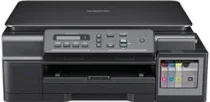
Brother DCP-T700W Driver lets the computer send print and scan commands to this ink-tank multifunction printer. After setup, the operating system can recognise the machine for printing and scanning. Copying still runs from the printer controls, while the driver keeps related computer communication available. A USB cable handles direct connection from a nearby computer. Wireless setup lets supported devices send jobs to the printer in the correct format.
Brother DCP-T700W Drivers for Windows
0ccadfe2f0c1412d054f5584c95e709745e251b63384c7c095b78438c1a712252a40b91fa12cc7dfd5d86c4bbf76ea6e8e368693cb6ca74e9e0380a6a587b48d2a40b91fa12cc7dfd5d86c4bbf76ea6e8e368693cb6ca74e9e0380a6a587b48d0edce9170c3f46f065e52aa6335c093befa453212698a94c7d59fcfc5197fa7eBrother DCP-T700W Drivers for Linux
c5ea917d0c208f76aa354162d7a58d5588dde4aa20949b667e911e2634d99b79b723bf322bc670e76e919c943f86cac2c067142dcc889835e8468df99e19bc46d1706b1be079d0ea07f5bb0a1cb11230d495aa0e0942549f430b54ac74cab9509636bb1985298e4688f080500d505ff559562f6616e3705e1b7398789c181f30027b73648722ac8c8eb1a9c419d284a6562cc763feac9740a2b75a683b09297289d82315fd9d629f8af7b5bc489f392da218acfe2436e42eec147246101636d5cda25534ea8e3018e7d46b970cb08b36084355adedc933aba0c8c7d03e903db901dc859f1978e645147ced5ec4b5448cc3e26b1c6d2f1104834f5891c0e174694225e91dd7f7d0ba2a202f616b15b669be7800c271a7d25efed94191f71fc4500fec3bcffeb597b2d23ef7ff31f34dc7bd8d4736a35c2d1ff5e56784d709ce532ba3bffcf199fee6387cb79d6923214648db0f2df1c5a13f8f8f0a6fe0995c401404f2622e60470b4de25d0cdb4adc0f130ace6b380cc0d4b3d7714ad761c1ae82aa17ba2e331de1fcb34f0a839d27b9b193ac680d9742250a89e588a6bd56206c4e17c6dbcf263d9d08fb460ccd5b9f1a23fce79b30d0a41d96a224839322b2Brother DCP-T700W Specifications
Brother DCP-T700W is an inkjet ink-tank multifunction printer for colour printing, scanning, and copying. Ink feeds from refillable tanks. Printing comes from a piezo head with 210 mono nozzles and three colour channels with 70 nozzles each. Memory is 64 MB, while the control panel uses a 16-character, one-line LCD. Originals can go on the flatbed glass or through the 20-sheet automatic document feeder.
Print resolution reaches up to 1200 x 6000 dpi, with borderless output on A4, Letter, A6, Photo, Photo 2L, and index-card sizes. Scanning reaches 1200 x 2400 dpi from the glass and 1200 x 600 dpi from the ADF. Interpolation raises scan resolution to 19200 x 19200 dpi. Copying works in colour or mono. Copies print at up to 1200 x 2400 dpi and scale from 25% to 400%.
Paper input comes through a front tray that holds about 100 sheets of 80 gsm plain paper, while output capacity reaches 50 sheets. The tray accepts plain, coated inkjet, and glossy media. Standard paper sizes include A4, Legal, Executive, Letter, JIS B5, A5, and A6. Envelopes cover Com-10, DL, C5, and Monarch. Photo media includes 10 x 15 cm, 13 x 18 cm, and 127 x 203 mm index cards.
Hi-Speed USB 2.0 handles the direct wired connection, while wireless LAN uses IEEE 802.11b/g/n in infrastructure or ad-hoc mode. Wireless setup can run through AOSS or WPS, and network security covers WEP, WPA-PSK, and WPA2-PSK. The body measures 435 x 374 x 180 mm and weighs 8.3 kg, while power use is about 16 W during copying, with ready, sleep, and off modes below 3 W.
Technical Details
| Title | Brother DCP-T700W Drivers |
|---|---|
| Device Type | All-in-one printer |
| Driver Version | Varies by driver and operating system |
| Available Downloads | Drivers |
| License | Free |
| Manufacturer | Brother Industries, Ltd. |