
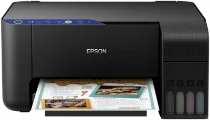
The Epson EcoTank L3151 printer model contains the Epson Micro Piezo print head as its print method. In addition, it has 180 nozzles for black document printing and 59 nozzles for printing each color. Meanwhile, its minimum ink droplet size is three picoliters (pl) with variable-sized droplet technology. Also, its ink technology is the dye ink, while the maximum printing resolution is 5760 x 1440 dots per inch (dpi). Epson EcoTank L3151 model also has an internal driver for duplex printing.
Epson EcoTank L3151 Drivers for Windows
5184d3b834eb9d23b77a88aea2e2278dc9a950c06c2665fe980aea49d9df118d2ccf2a24be2fe9c2ac46d57940e7eed9af97c577479b38a74a227c71c4eba3324eb72f0dc02ff5277a297cb294b250badfb68f5fee1a9412369e117fc8afcd5d53d83474406ff92f1148dc62c618167899aaba683ec0290a02505d6bdc744bcde296b0dd6f562045ca62037185b78ea08935c2397617465e6551a239e6f13b6cEpson EcoTank L3151 Drivers for macOS
7dd09b0964ec69a5b9fff5f4d02b3858cd683a8d45688f52919630913b4bc3ba469d47c8383fcbe50cff44ab16ee7e859ebf30b1269d0de20dd7e29899f9139d5132bb5ab0166ba9335c789d17df0fc364e5d5d89bff98c4e7369a519dc575ff90071b11984600791b1ab1b58f654ee83a3a90fed5e5b6be2162f41461badfc7Epson EcoTank L3151 Specifications
When printing, the standard print rate of ISO/IEC 24734 is about ten pages per minute (ppm) for monochrome or black printing. However, color printing has a print rate of 5 ppm under the same standard print rate. The rate is 33 ppm when using plain paper for black documents at the normal print mode. Moreover, color printing has a print rate of 15 ppm. When printing on Epson Premium Glossy photo paper, the print rate is 69 seconds per page.
The optical resolution is up to 1200×2400 dots per inch (dpi), while the formats include BMP, TIFF, PDF, and JPEG. Similarly, the scanning mode of this machine has a rate of 11 seconds per page when the input resolution is 200 dpi. However, color page scanning has a rate of 28 seconds. Similarly, it uses the contact image sensor (CIS) element. This machine also works with the A4, A5, A6, B5, B6, legal, letter, envelopes, and photo paper sizes.
Epson EcoTank L3151 has a paper loading capacity of up to 100 sheets of plain paper and 20 photo sheets. However, the output tray can contain 30 printed paper sheets. The recommended range is between 100 and 240 volts in the power supply voltage.
Technical Details
| Title | Epson EcoTank L3151 Drivers |
|---|---|
| Device Type | All-in-one printer |
| Driver Version | Varies by driver and operating system |
| Available Downloads | Drivers |
| License | Free |
| Manufacturer | Seiko Epson Corporation |