
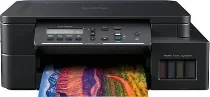
Brother DCP-T520W Driver helps the computer recognize this multifunction ink-tank printer during setup. After recognition, print, scan, and copy commands can pass through the selected connection. Wireless setup must also point the computer to the correct printer and scanner path. Once setup is complete, printed pages and scanned files can move between the computer and the Brother DCP-T520W with proper device recognition.
Brother DCP-T520W Drivers for Windows
2b7bd9fa242b39292dee2c6a01a98cac87fbc609f76e0d4bb11ebdfc9d4e8155461c16a926231325f9af311cf7f2db7731509aa718f28a6a5f94ee5a3252753c461c16a926231325f9af311cf7f2db7731509aa718f28a6a5f94ee5a3252753c0edce9170c3f46f065e52aa6335c093befa453212698a94c7d59fcfc5197fa7e620a6edb07eb3cc42101177454215a536ede7a369c6bf2ac76b88963d661307d71169ef33cab91b5dc1e848ff483c40ad2eec7be44e69fcb0c084a590a79b49eBrother DCP-T520W Drivers for macOS
a232dd6adb90e6f11046bc6703a9175cd6e918eaadc2405527cc12f4b6c5c8f9Brother DCP-T520W Drivers for Linux
fbed3f3eb39cfe93d16ff6fd68c8ef6f095c40f40c12cc4dd6390c10134c82f245f5759901264195b0506787a274d8fd573083dfb7fcb911e81ce99ddee845bc9c3a200db3dc7b2b3332dff8c5226b4f3ee560d20b2e1f4918b1faf7124517b2197f63a52e89b8744f5a3c2d843abb3b76d003d5d4830bdfe675c44841a6c72bcda25534ea8e3018e7d46b970cb08b36084355adedc933aba0c8c7d03e903db901dc859f1978e645147ced5ec4b5448cc3e26b1c6d2f1104834f5891c0e17469d724746540a51f8286f2a318b47657227f7131d384a1a4f0475dacb7e3580f3ee74ef3a5529ebf3b26d6139ce15d75374a4538ba2efd48c28b209b0d705e5ec72ba3bffcf199fee6387cb79d6923214648db0f2df1c5a13f8f8f0a6fe0995c401404f2622e60470b4de25d0cdb4adc0f130ace6b380cc0d4b3d7714ad761c1ae82aa17ba2e331de1fcb34f0a839d27b9b193ac680d9742250a89e588a6bd56206c4e17c6dbcf263d9d08fb460ccd5b9f1a23fce79b30d0a41d96a224839322b2Brother DCP-T520W Specifications
Brother DCP-T520W is a colour ink-tank multifunction inkjet for printing, scanning, and copying, while fax hardware is outside this DCP model. Printing comes from a piezo head with 70 nozzles for each colour. Refillable tanks take BTD60BK black and BT5000C, BT5000M, and BT5000Y colour bottles. Above the print engine, the flatbed scanner works with a one-line LCD and 128 MB memory for local control.
From Windows, print resolution reaches up to 1200 x 6000 dpi, while A4 print speed runs up to 17 ipm in mono and 9.5 ipm in colour. Fast mode reaches 30 ppm mono and 12 ppm colour, with first-print timing listed at up to 6 seconds mono and 9.5 seconds colour. Scanning reaches 1200 x 2400 dpi optical resolution, and copying reaches 1200 x 1800 dpi print resolution.
The flatbed accepts originals up to A4 size. Copy scaling moves from 25% to 400% in 1% steps, while N-in-1 copy modes cover 2-in-1, ID copy, and 4-in-1 through remote copy. Paper input comes through a 150-sheet standard tray and a one-sheet manual feed slot. Printed pages collect in a 50-sheet output area. Manual two-sided printing works up to A4 or Letter size.
Tray sizes include A4, Letter, Legal, Folio, Executive, A5, A6, envelopes, photo paper, and Indian Legal. The tray takes plain, inkjet, glossy, and recycled media from 64 to 220 gsm, while the manual slot reaches 300 gsm. A computer connects through Hi-Speed USB 2.0. Wireless printing uses wireless LAN, Wi-Fi Direct, AirPrint, Mopria, or Brother mobile printing. Dimensions are 435 mm x 380 mm x 159 mm, and weight is 7.3 kg.
Technical Details
| Title | Brother DCP-T520W Drivers |
|---|---|
| Device Type | All-in-one printer |
| Driver Version | Varies by driver and operating system |
| Available Downloads | Drivers |
| License | Free |
| Manufacturer | Brother Industries, Ltd. |