
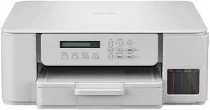
Brother DCP-T536DW Driver lets the computer send print and scan commands to this ink-tank multifunction printer. After setup, the operating system can recognise the machine for printing and scanning. Copying still runs from the printer controls, while the driver keeps related computer communication available. A USB cable handles direct connection from a nearby computer. Wireless setup lets supported devices send jobs to the printer in the correct format.
Brother DCP-T536DW Drivers for Windows
96b7f2ce97755135ac6b2779d46d68aa572b6e62386fbb86898779349361969b2e77eb5e59f5e6e88af9308da54976c037e98c902e6f14a6e820dc14fb2ee1672e77eb5e59f5e6e88af9308da54976c037e98c902e6f14a6e820dc14fb2ee1670edce9170c3f46f065e52aa6335c093befa453212698a94c7d59fcfc5197fa7e71169ef33cab91b5dc1e848ff483c40ad2eec7be44e69fcb0c084a590a79b49eBrother DCP-T536DW Drivers for macOS
a1fff702f88cd32dc8d97f985643ec4441d55ea4a2d4b47533b1a7d494af4d34Brother DCP-T536DW Drivers for Linux
a876678fa86d524d671a9ac3eedc7130b265b9ff9425d83945f317b299872b0bc46ec77a0602b208d06b7c5e1e69aa9bb59a3ae0dbed87df24a6fa1d6582d6289c3a200db3dc7b2b3332dff8c5226b4f3ee560d20b2e1f4918b1faf7124517b2197f63a52e89b8744f5a3c2d843abb3b76d003d5d4830bdfe675c44841a6c72bcda25534ea8e3018e7d46b970cb08b36084355adedc933aba0c8c7d03e903db901dc859f1978e645147ced5ec4b5448cc3e26b1c6d2f1104834f5891c0e17469d724746540a51f8286f2a318b47657227f7131d384a1a4f0475dacb7e3580f3ee74ef3a5529ebf3b26d6139ce15d75374a4538ba2efd48c28b209b0d705e5ec72ba3bffcf199fee6387cb79d6923214648db0f2df1c5a13f8f8f0a6fe0995c401404f2622e60470b4de25d0cdb4adc0f130ace6b380cc0d4b3d7714ad761c1ae82aa17ba2e331de1fcb34f0a839d27b9b193ac680d9742250a89e588a6bd56206c4e17c6dbcf263d9d08fb460ccd5b9f1a23fce79b30d0a41d96a224839322b2Brother DCP-T536DW Specifications
Brother DCP-T536DW is an ink-tank multifunction inkjet printer for colour printing, scanning, and copying. Fax hardware is not part of this model. A piezo head carries 210 black nozzles and 70 nozzles for each colour. The machine carries 128 MB of memory, while local operation uses a 16-character one-line LCD. Scanning relies on a CIS flatbed, and this lower DCP-T body has no automatic document feeder.
Print resolution reaches up to 1200 x 6000 dpi from Windows and up to 1200 x 3600 dpi from Mac. A4 speed is listed at 16.0 ipm in mono and 9.0 ipm in colour. Automatic duplex printing works on plain or recycled paper up to A4 or Letter size. Borderless printing is available. Copy output reaches 1200 x 1800 dpi and scales from 25% to 400%.
Paper input comes through a 150-sheet front tray and a one-sheet manual feed slot, while the output tray holds 50 sheets. The main tray accepts plain, inkjet, glossy, and recycled paper from 64 to 220 gsm, whereas the manual slot takes the same media types up to 300 gsm. Sizes cover A4, Letter, Legal, Folio, Executive, A5, A6, Photo L, Photo 2L, index cards, and C5, Com-10, DL, or Monarch envelopes.
Hi-Speed USB 2.0 handles the wired link, while wireless work can use wireless LAN, Wi-Fi Direct, AirPrint, Mopria, and Brother Mobile Connect. Wireless infrastructure mode uses IEEE 802.11b/g/n, whereas Wi-Fi Direct uses IEEE 802.11g/n. Ethernet is not listed for this model. The body measures 390 x 343 x 148.5 mm and weighs 6.3 kg. Power use is about 16 W during copying, 2.5 W ready, 0.6 W asleep, and 0.15 W off.
Technical Details
| Title | Brother DCP-T536DW Drivers |
|---|---|
| Device Type | All-in-one printer |
| Driver Version | Varies by driver and operating system |
| Available Downloads | Drivers |
| License | Free |
| Manufacturer | Brother Industries, Ltd. |