
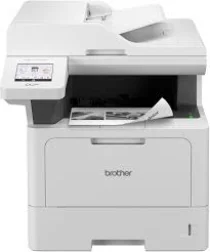
Brother DCP-L5510DW Driver helps the computer send print and scan commands to this monochrome laser multifunction machine. After installation, the operating system can identify the unit for printing, scanning, and copying. A local setup can use USB, while shared access can run through wired Ethernet or wireless networking. The driver keeps those jobs readable to the Brother machine, so pages and scanned files pass through the selected connection correctly.
Brother DCP-L5510DW Drivers for Windows
c60fa07df6f47b38d0f39c82efc61410440d2c8adce974f7cfb27cbc9d7f0c8bf13a9bd5c2a1619356eec76d2dfee8264722a2fc742ee4a69495740b4581a4a5f13a9bd5c2a1619356eec76d2dfee8264722a2fc742ee4a69495740b4581a4a5e03602d33d26952daa81cc8da4d5739ba571c6102073fc023b49aed3ad41cc446eddedfff4131bc903d581f6dc86a8518e1c82980a4cd38b4396c4c1bb1338d3ee2cabe92d46f7f6804a469fbdf46bfefbc58df649a126f936d83c3cc990a4efba40f5efe1d1d3896139bc31bc28b4a3f2e75c76684987239019db6a68d6977d5f3ad9dd0475f7524f0e489aa7076da168c228bcd22031394a53fad4b9a2573f71169ef33cab91b5dc1e848ff483c40ad2eec7be44e69fcb0c084a590a79b49eBrother DCP-L5510DW Drivers for macOS
ced39a97373636f55d0967e8b23ca5af4897884cf0b123af1f30b6b7a99ff6e9Brother DCP-L5510DW Drivers for Linux
f5360d3ab025a4778d3122f23f5b3d607a08fc6ae5dd0ca4fe38e61b66d8bb43d0ae203b868c01ecf48f25e9fefe66bbc32de67a981e83be84af81e9c1b362d29c3a200db3dc7b2b3332dff8c5226b4f3ee560d20b2e1f4918b1faf7124517b2197f63a52e89b8744f5a3c2d843abb3b76d003d5d4830bdfe675c44841a6c72bcda25534ea8e3018e7d46b970cb08b36084355adedc933aba0c8c7d03e903db901dc859f1978e645147ced5ec4b5448cc3e26b1c6d2f1104834f5891c0e17469d724746540a51f8286f2a318b47657227f7131d384a1a4f0475dacb7e3580f3ee74ef3a5529ebf3b26d6139ce15d75374a4538ba2efd48c28b209b0d705e5ec72ba3bffcf199fee6387cb79d6923214648db0f2df1c5a13f8f8f0a6fe0995c401404f2622e60470b4de25d0cdb4adc0f130ace6b380cc0d4b3d7714ad761c1ae82aa17ba2e331de1fcb34f0a839d27b9b193ac680d9742250a89e588a6bd56206c4e17c6dbcf263d9d08fb460ccd5b9f1a23fce79b30d0a41d96a224839322b2Brother DCP-L5510DW Specifications
The DCP-L5510DW is a monochrome laser multifunction machine for printing, scanning, and copying, while fax hardware stays with related MFC models. Printing comes from an electrophotographic laser engine backed by 1 GB of memory. Power input is 220 to 240 V AC, and the control panel carries a 3.5-inch TFT colour touchscreen. Above the flatbed, a 50-sheet automatic document feeder moves multi-page originals.
Print output reaches up to 1200 x 1200 dpi. One-sided speed runs at up to 48 ppm on A4 or 50 ppm on Letter. Automatic duplex printing runs at 24 sides per minute. From ready mode, the first page exits in less than 6.7 seconds. Scanning reaches 1200 x 1200 dpi from the glass, while the ADF scans at 600 x 600 dpi and interpolation reaches 19200 x 19200 dpi.
Paper input starts with a 250-sheet standard tray for plain, letterhead, coloured, thin, recycled, or thick paper. A 100-sheet multipurpose tray takes plain paper, bond, labels, envelopes, and heavier media. Brother lists COM-10, DL, C5, and Monarch sizes for envelopes. Printed pages collect in a 150-sheet face-down output area, while the face-up path holds one sheet. Optional lower trays add either 250 or 520 sheets per tray.
A computer can connect through USB 2.0 Type-B, while the front USB host port reads local files. Network setup can use Gigabit Ethernet or wireless networking with Wi-Fi Direct. The scanner glass accepts originals up to 216 x 300 mm, and the ADF covers 105 to 215.9 mm wide by 147.3 to 355.6 mm long. Physical size is approximately 417 x 448 x 461 mm. With supplies installed, weight is 17.4 kg.
Technical Details
| Title | Brother DCP-L5510DW Drivers |
|---|---|
| Device Type | All-in-one printer |
| Driver Version | Varies by driver and operating system |
| Available Downloads | Drivers |
| License | Free |
| Manufacturer | Brother Industries, Ltd. |