
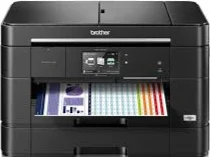
Brother MFC-J2320 Driver allows the computer to communicate with this inkjet multifunction printer for printing, scanning, copying, and faxing. After installation, the system can detect the machine and route commands through the chosen connection. Print jobs and scan requests can then pass to the hardware without the computer treating the printer as an unknown device. Copy and fax functions also respond through the configured software, reducing connection-related interruptions during document work.
Brother MFC-J2320 Drivers for Windows
c465db53b9767a9bbe76e8244922b6a43db14cf92c6a1d40018cc58ddfbef27f0e5897f3c20a3be5ef9a3b623f1753bb245df999d28385c989f796f07dd40c4d0e5897f3c20a3be5ef9a3b623f1753bb245df999d28385c989f796f07dd40c4d0edce9170c3f46f065e52aa6335c093befa453212698a94c7d59fcfc5197fa7e2f6fd4c664f75c1ec8b688d770813ded04ab1fe9a62101305ecd190c76aae405Brother MFC-J2320 Drivers for Linux
bb473e9e004318d55ab1be11a1021c22ae2f7f0c45a74d92e1dade6f0b8bbbfd02d9dff6efd66366adfa4e177cb8552a1ceafa16e5def1e42fffa0b56a51e177040dfe8b1a4834e061a1955f5a44434a65d2abb187185f985cd8fd432e8518e3ab785131fdb3983308059dc5f6b370b4e6598b0d4a7f080e2317d13daec5aa5d027b73648722ac8c8eb1a9c419d284a6562cc763feac9740a2b75a683b09297289d82315fd9d629f8af7b5bc489f392da218acfe2436e42eec147246101636d5cda25534ea8e3018e7d46b970cb08b36084355adedc933aba0c8c7d03e903db901dc859f1978e645147ced5ec4b5448cc3e26b1c6d2f1104834f5891c0e174694225e91dd7f7d0ba2a202f616b15b669be7800c271a7d25efed94191f71fc4500fec3bcffeb597b2d23ef7ff31f34dc7bd8d4736a35c2d1ff5e56784d709ce532ba3bffcf199fee6387cb79d6923214648db0f2df1c5a13f8f8f0a6fe0995c401404f2622e60470b4de25d0cdb4adc0f130ace6b380cc0d4b3d7714ad761c1aee28a8765f6637456d81ad1a56226e6857be2f1581fdcd9e4a5a4fbc4c42dd3450a4412b306b9ce2eb7e3ef4734a7b648f9561f525922b02541e98b545929dc2b82aa17ba2e331de1fcb34f0a839d27b9b193ac680d9742250a89e588a6bd56206c4e17c6dbcf263d9d08fb460ccd5b9f1a23fce79b30d0a41d96a224839322b2Brother MFC-J2320 Specifications
The Brother MFC-J2320 is a colour inkjet multifunction printer with print, scan, copy, and fax functions. Printing comes from a piezo printhead with 420 mono nozzles and 420 nozzles for each colour channel. Its ink set uses black, cyan, magenta, and yellow. On the front panel, a 2.7-inch colour touchscreen sits beside touch controls. Internal memory is 128 MB, and a 35-sheet automatic document feeder sits above the scanner.
Print resolution reaches up to 1,200 x 6,000 dpi. ISO speed runs up to 22 ipm in mono and 20 ipm in colour, while the flatbed scans at 1,200 x 2,400 dpi. The automatic document feeder scans at 1,200 x 1,200 dpi. Interpolated resolution reaches 19,200 x 19,200 dpi. Copying works in colour or mono, sorting 99 pages and scaling from 25% to 400%.
Paper Tray 1 holds up to 250 sheets of 80 gsm paper and takes sizes up to A3, Ledger, JIS B4, and Legal. For single sheets, the manual feed slot accepts large formats as well as Folio, envelopes, photo paper, and index-card media. Printed pages collect in a 50-sheet output area. Automatic duplex printing is limited to plain A4, Letter, A5, Executive, and JIS B5 paper.
Borderless printing covers A3, Ledger, A4, Letter, A6, and photo sizes. Wired connections use Hi-Speed USB 2.0 or Ethernet, while wireless work can run through wireless LAN or Wi-Fi Direct. Setup can use WPS or AOSS. Photo input works through a USB flash drive and PictBridge camera connection, but the broader memory-card slot set is absent. Closed dimensions are 490 x 290 x 240 mm, with a weight of about 10.8 kg.
Technical Details
| Title | Brother MFC-J2320 Drivers |
|---|---|
| Device Type | All-in-one printer |
| Driver Version | Varies by driver and operating system |
| Available Downloads | Drivers |
| License | Free |
| Manufacturer | Brother Industries, Ltd. |