
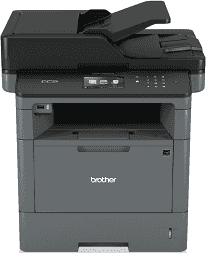
The Brother DCP-L5500DN printer has many unique features that help it to stand out among many others. The device has an electrophotographic laser print technology. This Brother DCP-L5500DN printer also has an internal memory capacity of about 256 MB of RAM, and this supports the processor to produce good quality. Here is also a liquid crystal display (LCD) part of the printer with a diagonal measurement of 3.7 inches. This component also has a TFT color touchscreen for ease of operation by the user.
Brother DCP-L5500DN Drivers for Windows
74e3316f6404fe2e41985adad72719fd28d59f12dce8cc8c50e143afa7ad9b138bf9b3eaa473ffcbc6b3ab6d6040a21176cd619e9f4057ee117c131798b681e1Brother DCP-L5500DN Drivers for macOS
f3a27f3126f7b3b5a04e0481ad743564f6fd1d6e039ec33ec3c687af15a1aa0aab64878616f2d0ddbf65ea85e386b8e122bd5549079ad82012a8d47a21079c992b229ea56fe0606c51a04cf94f9d615a96308c25f6e7574d3490237b47e68261e0c68c4dc939326de2735539c973e4f61ad2c147df5bb7b80127e7286875d4866a9ef2865964ff4918dd1441876a80485fb8c329df36aa8d6680deff2eecd53ed61b96c1411212faa0b4f1f6ffe903dbef636b138caa5cbf817eaf56f7cfad7cccdacb0e41d0087152dd86a37ab0ed248a7743711ca031efebc0e68d26c3a5869b042362a8c1fd58d9de51491ce470f6c8c4768fe89b4d850027c6b96acb24a76418e4601d7e6d07b58caaa4aa98aae06d345f527a5ebb810eeb7eefd38b38fc8916be8720d64390e65126bf4c8dce493929c07838ec2ca12e1c2b50490b28c5d418fbfaae10f13000f9ee354c6c25cd84da5adee77b4bcfe8f7b1fd040538d18df5b36b02f0a369cb97460d30d0d8212129aea5e5f95f36c885f4244a161dd467fc9252f2235c91dc8f270bea88d1ceb067770484c4838eb35b74e1370a90ddBrother DCP-L5500DN Drivers for Linux
1a535ed8cdbb6b888b8acc4034d6de29060ce806b8ce303407376c584ce6542d13c58f57419c22985e9a5ad3207d06ba431bc91fb1fd79ad745ed4015c582085ade0d932e04bd65578135dd0a2de0f6028547413832b03082b4068b0c7203633360b4125a7fbb812bcb96fbc0da13bc7e06f6ff5255b19352316704e0351a65f027b73648722ac8c8eb1a9c419d284a6562cc763feac9740a2b75a683b0929727d7dcbe8349ae4d4ab816e4551017f2f1fd9fd6bf3f4f3c570fbd9576248dd9f4225e91dd7f7d0ba2a202f616b15b669be7800c271a7d25efed94191f71fc4508bd395b8a25a385eb4a5e2770d4b10b17735203006b7a90a6879a0ef69e5fe4dBrother DCP-L5500DN Specifications
The power source of the printer must range between 220 and 240 volts of an AC at 50 to 60Hz frequency. Furthermore, the printer consumes up to 645 watts of power at standard printing or copying. However, during these processes in the quiet mode, the power consumption is not more than 39 watts. This feature shows how conservative the power saver or quiet mode is. The active method uses 34 watts; the sleep mode uses 7.5 watts, while the deep sleep mode requires 1.6 watts. Finally, the power off mode uses 0.04 watts, all at the same temperature of 250C.
Physically, this Brother DCP-L5500DN printer measures a height of 427 mm, a depth of 486 mm and a width of 435 mm, the printer weight is about 16.4 kg while it produces a printing noise of 54dB (A) and 35dB (A) at copying mode. The environmental conditions that must be in place before this printer can perform optimally include a temperature range. The range is between 10 and 320C during operations and between 0 and 400C during storage.
In the case of humidity, the acceptable range is between 20 and 80% for operations without condensation. Whereas, the recommended range is between 35 to 85% for storage, without condensation. The printer also contains the automatic document feeder (ADF) part which can support the main input tray with up to 40 sheets.
Technical Details
| Title | Brother DCP-L5500DN Drivers |
|---|---|
| Device Type | All-in-one printer |
| Driver Version | Varies by driver and operating system |
| Available Downloads | Drivers |
| License | Free |
| Manufacturer | Brother Industries, Ltd. |