
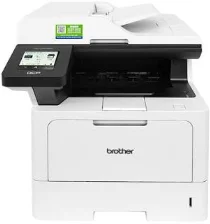
Brother DCP-L5518DN Driver lets the computer send print and scan commands to this monochrome multifunction printer. After installation, the operating system can identify the machine for printing and scanning, while copying remains available from the control panel. A nearby computer may connect through USB, and network jobs travel through the wired Ethernet port. The driver converts each job into instructions the printer can process correctly.
Brother DCP-L5518DN Drivers for Windows
b70c0366dc0c8394b3655fe47271e28f3549acb3702f0d813c51fbf25f319291f13a9bd5c2a1619356eec76d2dfee8264722a2fc742ee4a69495740b4581a4a5f13a9bd5c2a1619356eec76d2dfee8264722a2fc742ee4a69495740b4581a4a5e03602d33d26952daa81cc8da4d5739ba571c6102073fc023b49aed3ad41cc446eddedfff4131bc903d581f6dc86a8518e1c82980a4cd38b4396c4c1bb1338d3ee2cabe92d46f7f6804a469fbdf46bfefbc58df649a126f936d83c3cc990a4efba40f5efe1d1d3896139bc31bc28b4a3f2e75c76684987239019db6a68d6977d5f3ad9dd0475f7524f0e489aa7076da168c228bcd22031394a53fad4b9a2573f71169ef33cab91b5dc1e848ff483c40ad2eec7be44e69fcb0c084a590a79b49eBrother DCP-L5518DN Drivers for macOS
3d47651cbaceb576a31d74893daf42a6049ccb331d85461ae5e6933f1410e05fBrother DCP-L5518DN Drivers for Linux
17cc67afd00874450f894b39b733a43161d3a5e2990063c1417d37c6a341c8efb6d2ce39f13c023b8f6e6108fd0f88d9fc0e7083ffe591f6a6b09889ba6ffce09c3a200db3dc7b2b3332dff8c5226b4f3ee560d20b2e1f4918b1faf7124517b2cda25534ea8e3018e7d46b970cb08b36084355adedc933aba0c8c7d03e903db901dc859f1978e645147ced5ec4b5448cc3e26b1c6d2f1104834f5891c0e17469d724746540a51f8286f2a318b47657227f7131d384a1a4f0475dacb7e3580f3ee74ef3a5529ebf3b26d6139ce15d75374a4538ba2efd48c28b209b0d705e5ec72ba3bffcf199fee6387cb79d6923214648db0f2df1c5a13f8f8f0a6fe0995c401404f2622e60470b4de25d0cdb4adc0f130ace6b380cc0d4b3d7714ad761c1ae82aa17ba2e331de1fcb34f0a839d27b9b193ac680d9742250a89e588a6bd56206c4e17c6dbcf263d9d08fb460ccd5b9f1a23fce79b30d0a41d96a224839322b2Brother DCP-L5518DN Specifications
The Brother DCP-L5518DN is a monochrome laser multifunction machine with print, scan, and copy functions. Fax hardware is reserved for related MFC models. Its electrophotographic laser engine works with 1 GB of memory, and a 3.5-inch TFT colour touchscreen provides access to the menus. A 50-sheet automatic document feeder sits above the flatbed for multipage originals. The scanner glass accepts documents measuring up to 216 x 300 mm.
Standard print quality is 600 x 600 dpi, with the highest setting reaching 1200 x 1200 dpi. One-sided output runs at up to 48 ppm on A4 or 50 ppm on Letter. Automatic duplex printing reaches 24 sides per minute. From ready mode, the first page exits in under 6.7 seconds. The flatbed scans at up to 1200 x 1200 dpi, while the document feeder reaches 600 x 600 dpi. Interpolated scan resolution rises to 19200 x 19200 dpi.
The main tray holds 250 sheets and accepts A4, Letter, Legal, Folio, Executive, B5, A5, and A6 paper. India Legal, Mexico Legal, 16K, and A4 Short sizes also fit this tray. A separate 100-sheet multipurpose tray feeds plain, recycled, bond, label, thick, or envelope media. Automatic duplexing uses A4 paper weighing 60 to 105 g/m2. Optional lower trays add either 250 or 520 sheets of storage.
A nearby computer can connect through the USB 2.0 High-Speed Type-B port. The front USB host port permits direct printing from compatible storage devices. Wired network access runs through 10Base-T, 100Base-TX, or 1000Base-T Ethernet. Wireless LAN belongs to the related DW version and is not fitted to this DN model. The chassis measures 417 x 448 x 461 mm and weighs 16.4 kg with supplies installed. Power consumption is about 670 W during printing and 31 W in ready mode.
Technical Details
| Title | Brother DCP-L5518DN Drivers |
|---|---|
| Device Type | All-in-one printer |
| Driver Version | Varies by driver and operating system |
| Available Downloads | Drivers |
| License | Free |
| Manufacturer | Brother Industries, Ltd. |