
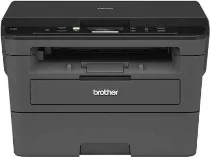
Brother DCP-L2530DW Driver helps the computer communicate correctly with this monochrome multifunction printer. The driver identifies the print, scan, and copy functions without adding fax support. A computer can connect through USB or a wireless network, depending on the setup. After installation, print jobs and scan commands can move correctly between the computer and machine.
Brother DCP-L2530DW Drivers for Windows
59d22fb3350039ea62f83bcedc56577e2291dc148c487d4e9d4b48b2beacc6906722a890472e2cab4d5c8347e7f6d3b47aa1b0375cbb3179888873251b043bf06722a890472e2cab4d5c8347e7f6d3b47aa1b0375cbb3179888873251b043bf0a1eba9683e8b58e4686d7b8362f7297b80c9d454d051000da98ab810634f45d1Brother DCP-L2530DW Drivers for Linux
7f9971c29ee2bba82f98fec3537c50307f2b39cb944f4be5c554d489383579ea3d9d27ec5b22111202c35eb86b801d60ce9e9a874179ff4acc8fef14fec355e4027b73648722ac8c8eb1a9c419d284a6562cc763feac9740a2b75a683b09297289d82315fd9d629f8af7b5bc489f392da218acfe2436e42eec147246101636d5cda25534ea8e3018e7d46b970cb08b36084355adedc933aba0c8c7d03e903db901dc859f1978e645147ced5ec4b5448cc3e26b1c6d2f1104834f5891c0e174694225e91dd7f7d0ba2a202f616b15b669be7800c271a7d25efed94191f71fc4500fec3bcffeb597b2d23ef7ff31f34dc7bd8d4736a35c2d1ff5e56784d709ce532ba3bffcf199fee6387cb79d6923214648db0f2df1c5a13f8f8f0a6fe0995c401404f2622e60470b4de25d0cdb4adc0f130ace6b380cc0d4b3d7714ad761c1ae82aa17ba2e331de1fcb34f0a839d27b9b193ac680d9742250a89e588a6bd56206c4e17c6dbcf263d9d08fb460ccd5b9f1a23fce79b30d0a41d96a224839322b2Brother DCP-L2530DW Specifications
The Brother DCP-L2530DW is a monochrome laser multifunction printer for printing, scanning, and copying. Its electrophotographic laser engine works with 64 MB of memory. The control panel has a 16-character, two-line LCD, with physical copy and scan keys beside it. Originals sit on the flatbed glass because Brother does not list an automatic document feeder. Fax hardware is not listed for this model either.
Print resolution can use 600 x 600 dpi, HQ1200 quality, or 1200 x 1200 dpi. A4 pages print at up to 30 pages per minute. For two-sided pages, the automatic duplex unit reaches up to 15 sides per minute. The first page leaves ready mode in less than 8.5 seconds. The flatbed scanner records colour and black-and-white originals at up to 1200 x 1200 dpi, while copying uses a 210 mm width.
The paper cassette holds up to 250 sheets of 80 g/m² plain paper. It takes A4, Letter, A5, A5 Long Edge, A6, and Executive sizes. Supported tray weights run from 60 to 163 g/m². The manual feed slot takes one sheet at a time, including COM-10, DL, C5, and Monarch envelopes. Printed pages collect face down in a 120-sheet output area, while one sheet can leave through the face-up path.
A nearby computer can connect through Hi-Speed USB 2.0, while wireless setup is available without a listed Ethernet port. Network Wi-Fi uses IEEE 802.11b/g/n, and Wi-Fi Direct uses IEEE 802.11g/n for a direct link. The closed body is 410 mm wide, 398.5 mm deep, and 272 mm high. With supplies installed, weight is 10.3 kg; power use is about 440 W printing, 42 W ready, 6.2 W sleep, and 0.03 W off.
Technical Details
| Title | Brother DCP-L2530DW Drivers |
|---|---|
| Device Type | All-in-one printer |
| Driver Version | Varies by driver and operating system |
| Available Downloads | Drivers |
| License | Free |
| Manufacturer | Brother Industries, Ltd. |