
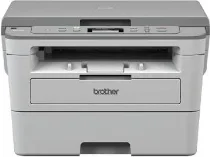
Brother DCP-B7500D Driver helps the computer communicate correctly with this monochrome laser multifunction printer. After installation, the operating system can recognize the machine for printing and scanner access. Copying runs from the printer hardware itself, so it does not rely on a computer command. Faxing is not built into this DCP model. A USB connection carries print and scan data between the computer and the machine.
Brother DCP-B7500D Drivers for Windows
e05b53fbd01649079680df57d1480f3f8c2cdbfa2ac50e5e6f530eb4b768e0816722a890472e2cab4d5c8347e7f6d3b47aa1b0375cbb3179888873251b043bf06722a890472e2cab4d5c8347e7f6d3b47aa1b0375cbb3179888873251b043bf0ee2cabe92d46f7f6804a469fbdf46bfefbc58df649a126f936d83c3cc990a4efba40f5efe1d1d3896139bc31bc28b4a3f2e75c76684987239019db6a68d6977da1eba9683e8b58e4686d7b8362f7297b80c9d454d051000da98ab810634f45d1632666bd95643d05db8320ac2695b1fc95238ea2495ab0ef4d7ff1f37a56446b6eddedfff4131bc903d581f6dc86a8518e1c82980a4cd38b4396c4c1bb1338d34d08250d1d8c34040671039b36a6d3ed3f551126c826f63b656cb9cd86754da35f3ad9dd0475f7524f0e489aa7076da168c228bcd22031394a53fad4b9a2573fBrother DCP-B7500D Drivers for macOS
e0c68c4dc939326de2735539c973e4f61ad2c147df5bb7b80127e7286875d486ac24dc9ef5043009b2f2646e04861883d81baeb6d1d13139b1686028b80f59c0Brother DCP-B7500D Drivers for Linux
7c236dcd904819f304c78f695a799fb8231fd14a98aa97cebf6e331f16b4e73df7c6e390f1a653c383d4898cb686e558ef883f94bd1ad76d997d2fcc70f74f43027b73648722ac8c8eb1a9c419d284a6562cc763feac9740a2b75a683b09297289d82315fd9d629f8af7b5bc489f392da218acfe2436e42eec147246101636d5cda25534ea8e3018e7d46b970cb08b36084355adedc933aba0c8c7d03e903db901dc859f1978e645147ced5ec4b5448cc3e26b1c6d2f1104834f5891c0e174694225e91dd7f7d0ba2a202f616b15b669be7800c271a7d25efed94191f71fc4500fec3bcffeb597b2d23ef7ff31f34dc7bd8d4736a35c2d1ff5e56784d709ce532ba3bffcf199fee6387cb79d6923214648db0f2df1c5a13f8f8f0a6fe0995c401404f2622e60470b4de25d0cdb4adc0f130ace6b380cc0d4b3d7714ad761c1ae82aa17ba2e331de1fcb34f0a839d27b9b193ac680d9742250a89e588a6bd56206c4e17c6dbcf263d9d08fb460ccd5b9f1a23fce79b30d0a41d96a224839322b2Brother DCP-B7500D Specifications
Brother DCP-B7500D is a monochrome laser multifunction printer for printing, scanning, and copying. Fax hardware is not built into this DCP model. Printing uses an electrophotographic laser engine with 128 MB of standard memory. The control panel carries a 16-character, two-line LCD for menu feedback and status messages. The India-listed machine runs from a 220 to 240 V AC, 50/60 Hz power supply.
Print resolution can run at 600 x 600 dpi, 1200 x 1200 dpi, or Brother HQ1200 quality at 2400 x 600 dpi. One-sided output reaches up to 34 pages per minute on A4 and 36 pages per minute on Letter. For duplex work, automatic two-sided printing reaches 16 pages per minute on A4. From ready mode, the first page comes out in less than 8.5 seconds. Copy resolution is 600 x 600 dpi.
Scanning captures colour and black originals through the scanner glass. No automatic document feeder is fitted, so each original must be placed on the flatbed separately. Optical scan resolution from the glass reaches up to 1200 x 1200 dpi. Interpolated scanning can rise to 19200 x 19200 dpi. Copying can sort documents, stack up to 99 pages, and scale output from 25% to 400% in one-percent increments. Maximum copy width is 210 mm.
Paper feeds from a 250-sheet main tray for plain, thin, or recycled paper. A single-sheet multipurpose slot handles one extra sheet outside the main cassette. Printed pages collect face down, with room for up to 120 sheets of 80 g/m² plain paper. Listed paper sizes include A4, Letter, Legal, Folio, Mexico Legal, India Folio, Executive, A6, A5, and A5 long-edge. Local connection runs through Hi-Speed USB 2.0. The listed hardware leaves out Ethernet and wireless LAN.
Technical Details
| Title | Brother DCP-B7500D Drivers |
|---|---|
| Device Type | All-in-one printer |
| Driver Version | Varies by driver and operating system |
| Available Downloads | Drivers |
| License | Free |
| Manufacturer | Brother Industries, Ltd. |